











I have been a music savvy ever since, and the only way I get in touch with my favourite music is through converting Youtube videos to MP3. I have been using VidtoMP3 site for my music downloads, but I always encounter issues like conversion lags, ads popping, unfinished conversion resulting to half-streamed MP3, and the worst of all is unwanted malwares and viruses that disrupts my computer. In time, the convenience of using vidtoMP3 have been weighing more stress than the joy of downloading music through it. I tried several other converting sites but it is just the same.
VideoPower YELLOW is similar with VideotoMP3, except that the latter is online, but VideoPower YELLOW is a software, this means it is free from annoying ads that can pop anytime before even a conversion happens.
The Façade – This is the view of VideoPower YELLOW, upon opening. It doesn’t automatically bring users to the usual pasting URL where download/conversion happens right away, instead it shows a display of multiple functions, such as record and radio. It also contains an independent search engine for music where conversion is not needed in the search menu. It also works like iTunes where users can store and play music at the same time.

STEP 1
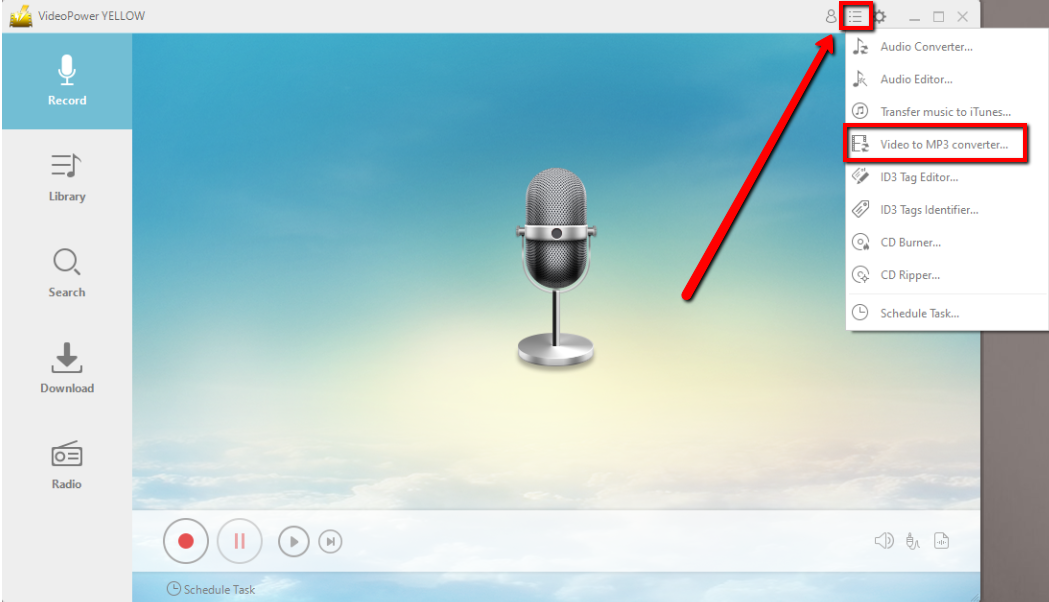
Open Youtube and search for the desired music to be converted. Highlight and copy the link of the video of choice. Open VideoPower YELLOW and go directly to the upper right of the display and click the menu right beside the licensing extension. Multiple functions of VideoPower YELLOW are available from Audio converter to task scheduling. Click on Video to MP3 converter function.
STEP 2
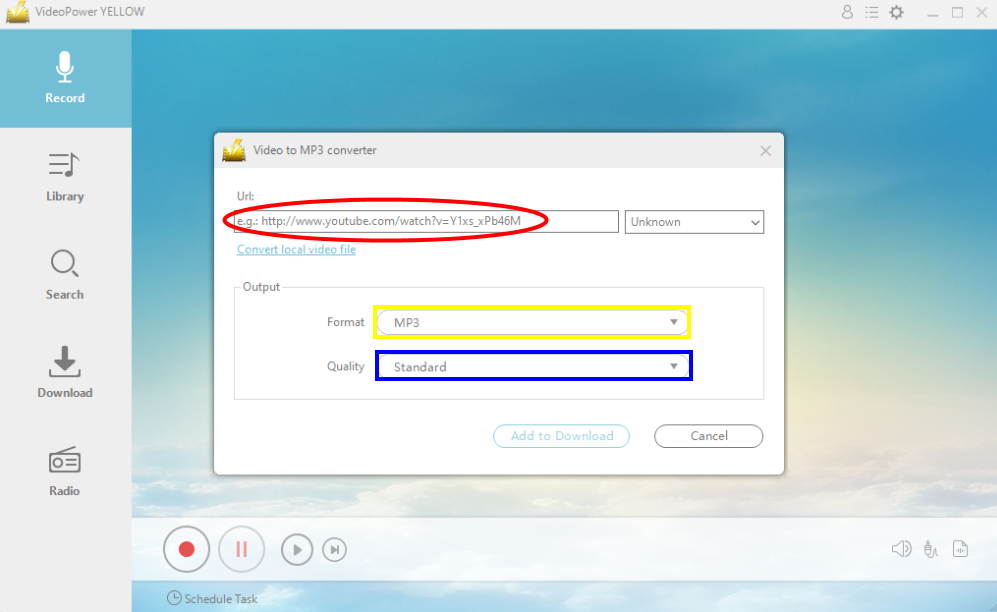
Paste the link on the space provided for conversion highlighted in red. Notice that it automatically detects the source of the video in the smaller box right beside it. It can even convert video files that are already in the local files right at the bottom of the link pasted.
Format of the video converted can also be converted to other file types not limited to MP3, from MP2 to WAV (highlighted in yellow). Quality can also be altered to higher standard (highlighted in blue). Press “add to download” to proceed to conversion and download.
STEP 3
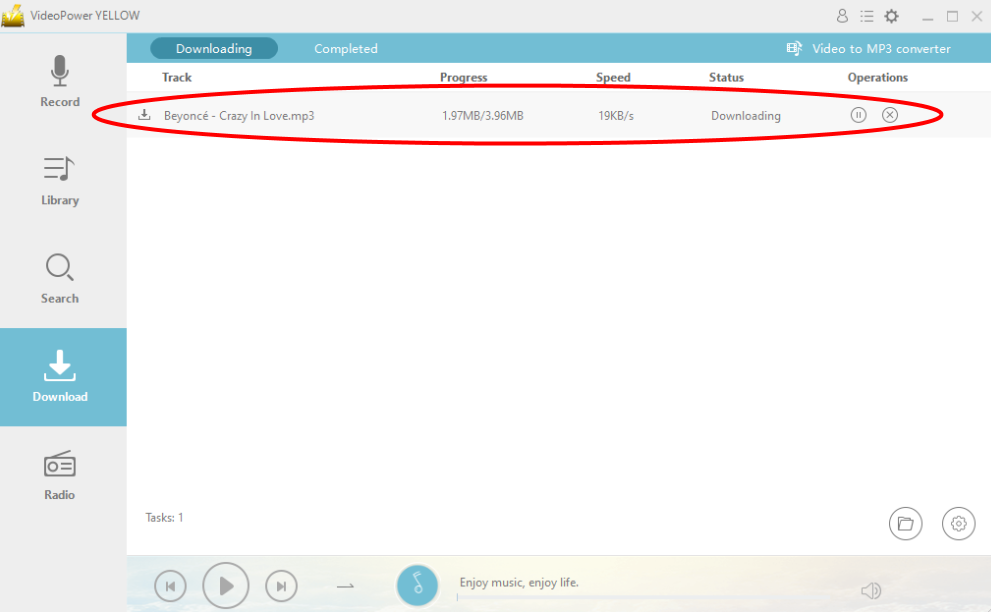
After clicking for conversion, VideoPower YELLOW will directly navigate you to the download display to view download status (highlighted in red). A notification bell will ring from the software to notify user that the download process has been done.
STEP 4
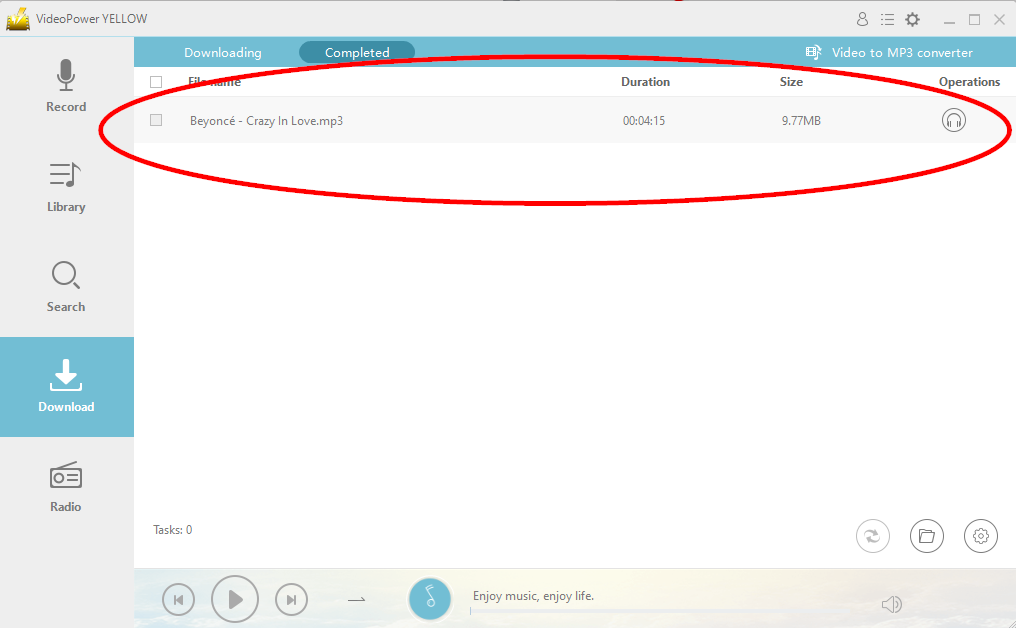
After the downloading process has been done, the downloaded and converted song will automatically be displayed on the completed download list right next to the downloading list. Song specifications such as duration and size is also displayed.
VideoPower YELLOW also have a dedicated audio editing tool, CD burner, and can transfer music directly to iTunes which makes Apple product users cut short to the process. Multiple functions makes VideoPower YELLOW a product to trust for your music needs, it does more than enough than the usual online conversion.




ZEUS Series
VideoPower brother products, start easier with more affordable prices!
| ZEUS BUNDLE 1 Year License ⇒ $29.99 |
ZEUS BUNDLE LITE 1 Year License ⇒ $19.99 |
ZEUS RECORD LITE 1 Year License ⇒ $9.98 |
ZEUS DOWNLOAD LITE 1 Year License ⇒ $9.98 |
||
| Screen Recorder | Screen&Audio Recording | ✔ | ✔ | ✔ | |
| Duration Setting, Schedule Recording | ✔ | ||||
| Video Downloader | Paste URL to download, batch download | ✔ | ✔ | ✔ | |
| Search/download video,browser detector | ✔ | ||||
| Music Recorder | Record music and get music ID3 tag info | ✔ | ✔ | ||
| Music search/download/record, CD Ripper/Creator, Audio Editor | ✔ | ||||
| Video Editor | Edit and convert videos, create slideshow | ✔ | |||
| Screen Capture | Capture screen, image editor | ✔ | |||