











For music lovers who want to enjoy their favorite music offline for free anytime and anywhere, Sound Recorder is a must-have tool. With the help of the audio recorder, any music that can be found on the Internet is able to be recorded and saved as an audio file in any format that is compatible with your device.
However, there are too many recording tools out there that have a hard time choosing which one is the most suitable. For Windows users, this won’t be a problem anymore since the best audio recording software is introduced in this article to record sound on Windows in high-quality easily
VideoPower GREEN or ZEUS – is the best desktop tool for basic video/audio recording and screen capturing. It has multiple functions and is easy to use with no tech knowledge required at all. It enables you to record movies, video tutorials, games, live streams, calls, and more.
ZEUS can do what VideoPower series can do and more with an almost similar interface.
Check out NOW! Start easier with more affordable prices!
Guide to Record Audio on Windows
Step 1: Choose sound source
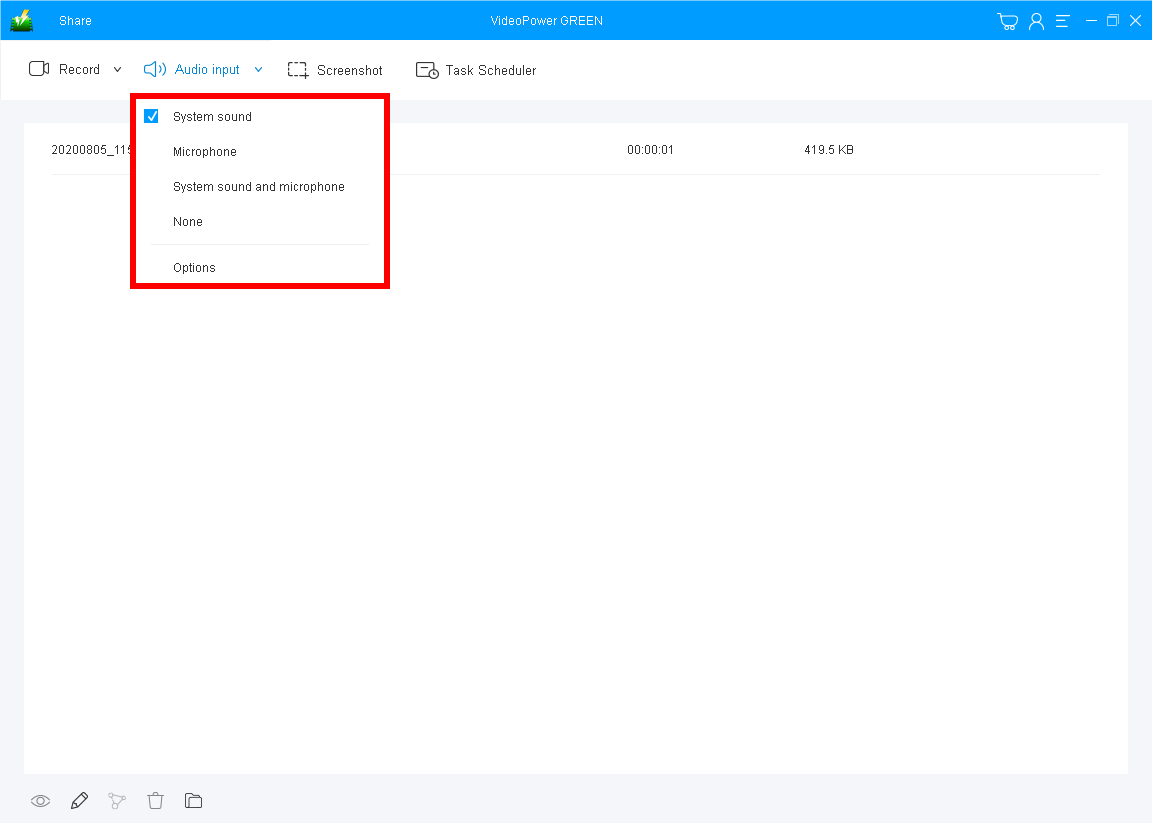
Click the “Audio input” drop-down button to choose the sound source as preferred. There are 4 options: System sound, Microphone, System Sound and Microphone, or None. In recording sound from desktop, use “System Sound” as default.
Step 2: Set the recording mode to start
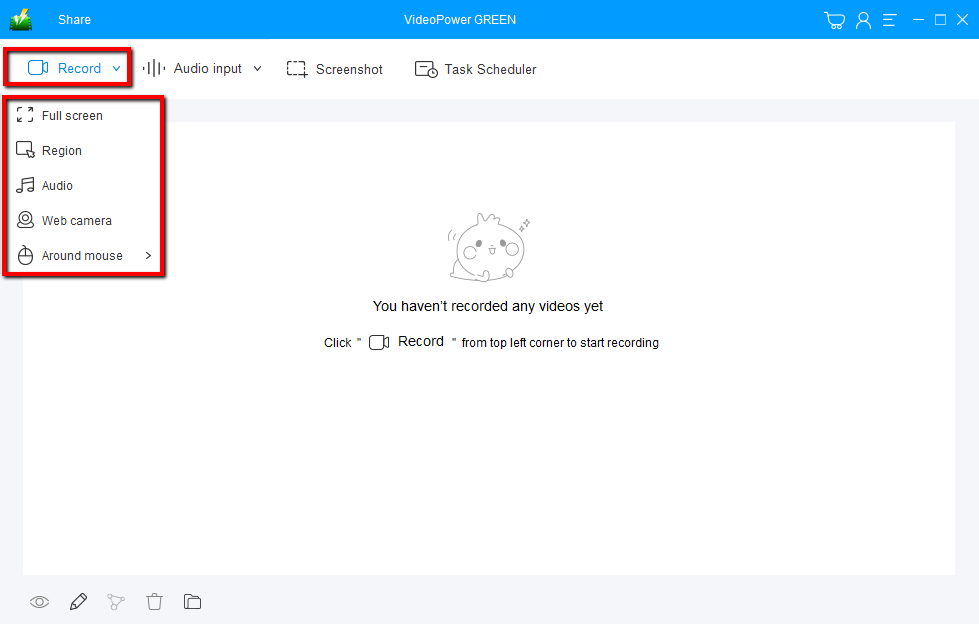
Click on the “Record” button to choose “Audio”, then the software will start recording the sound from the computer immediately.
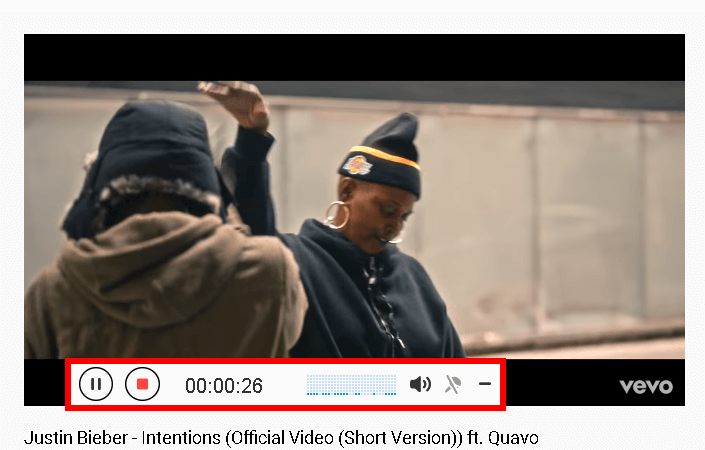
Play the sound/music that you want to record. The toolbar will appear where you can adjust the volume.
Click the “Stop” button to end the recording. After that, the recorded file is already saved in the pointed output folder.
Step 3: Check the audio file
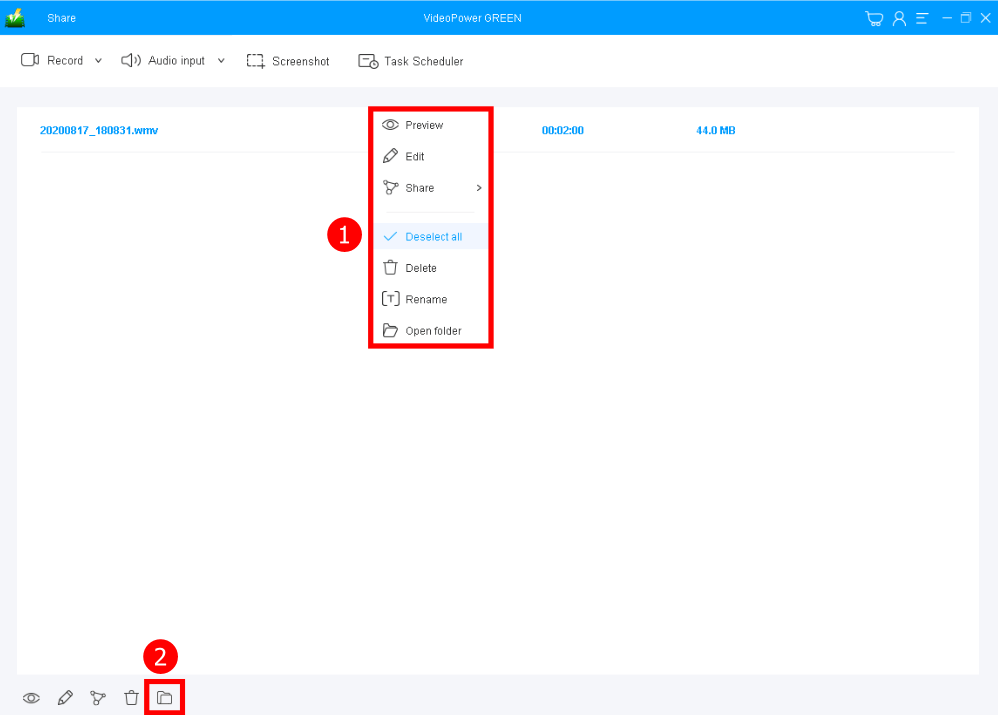
1. Your recorded file can be seen in the main interface. You can right-click the file and do more operations such as edit the recorded audio or preview it.
2. Click the folder icon to view it in the pointed output folder.
Conclusion:
Many people find pleasure, warmth, peace, company, and many more in listening to music. But then, not having enough internet sources for your device will cut the fun.
VideoPower GREEN will let you continue enjoying the fun and calmness brought by the sounds of music. With this, you can easily record any and varied sounds and music of your choice from any websites you want without any hassle. Then, you can enjoy listening to it anytime you want and wherever you are.
ZEUS series can do everything that VideoPower series can do and more, the interface is almost the same.
Check out NOW! Start easier with more affordable prices!




ZEUS Series
VideoPower brother products, start easier with more affordable prices!
| ZEUS BUNDLE 1 Year License ⇒ $29.99 |
ZEUS BUNDLE LITE 1 Year License ⇒ $19.99 |
ZEUS RECORD LITE 1 Year License ⇒ $9.98 |
ZEUS DOWNLOAD LITE 1 Year License ⇒ $9.98 |
||
| Screen Recorder | Screen&Audio Recording | ✔ | ✔ | ✔ | |
| Duration Setting, Schedule Recording | ✔ | ||||
| Video Downloader | Paste URL to download, batch download | ✔ | ✔ | ✔ | |
| Search/download video,browser detector | ✔ | ||||
| Music Recorder | Record music and get music ID3 tag info | ✔ | ✔ | ||
| Music search/download/record, CD Ripper/Creator, Audio Editor | ✔ | ||||
| Video Editor | Edit and convert videos, create slideshow | ✔ | |||
| Screen Capture | Capture screen, image editor | ✔ | |||