











Setting countdown for people before recording. It is an important tool so you will ready yourself and avoid recording again and again.
VideoPower GREEN or ZEUS has a special feature before the recording starts- countdown. This allows users to anticipate that the recording will start at the end of the countdown. This article will serve as a guide on how to adjust, enable, and disable the VideoPower GREEN’s countdown feature by going through the product settings.
VideoPower GREEN is an impressive application software for screen capturing and screen recording and is trusted in hiding unnecessary icons and taskbars during the process of recording through the tips discussed below.
Download the software by clicking the link below.
ZEUS can do what VideoPower series can do and more with an almost similar interface.
Check out NOW! Start easier with more affordable prices!
Countdown Recording Scheduled Setting
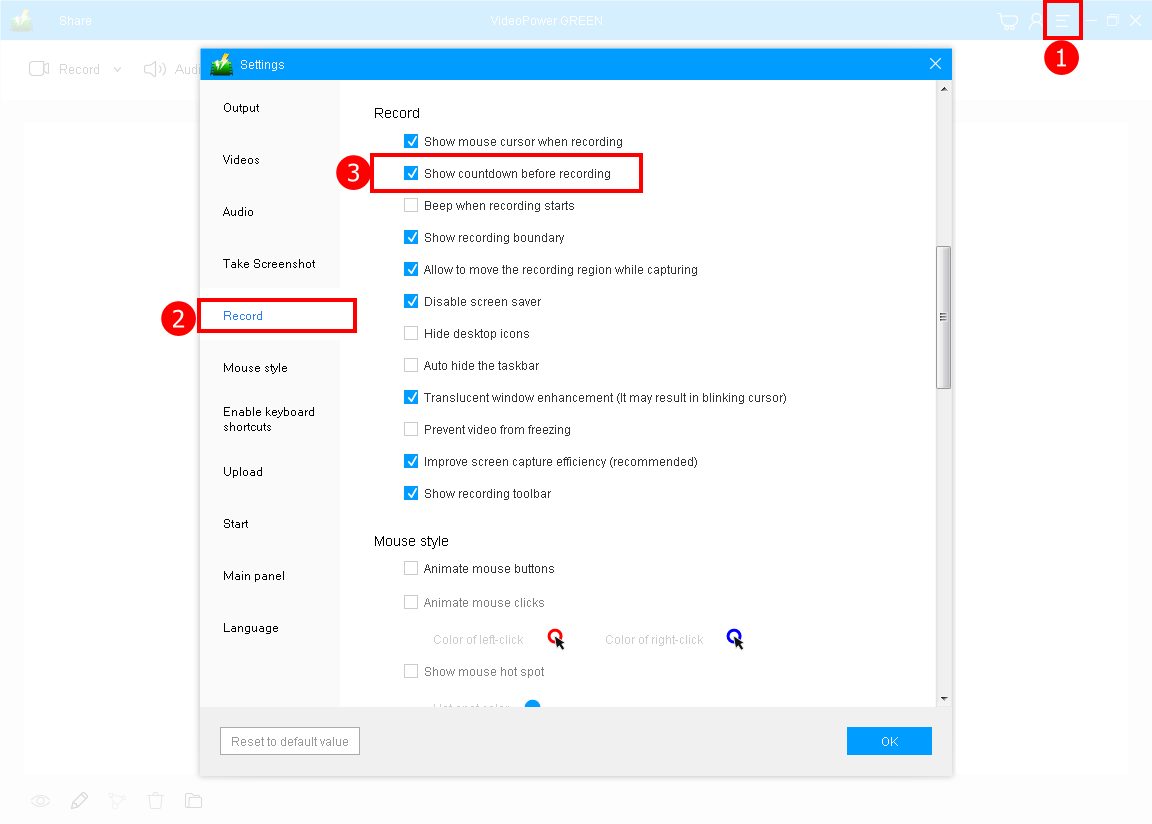
1) Click the menu on the upper right corner of the interface and choose settings from the drop-down menu.
2) Go to the “Record” window on the left side of the interface.
3) Check “Show countdown before recording” to display the countdown and spare 3 seconds waiting time.
After changing the settings, click the “OK” button to save and close the advance setting screen.
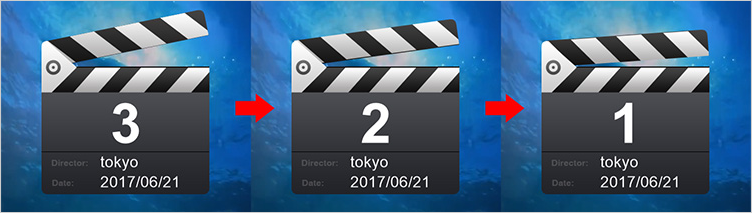
If the countdown is enabled, the above clapperboard will display before recording starts.
Conclusion:
VideoPower GREEN has features unlike any other software when it comes to screen recording. Setting the countdown to start recording is easier using this software.
In addition, it is also possible to set the time and date to automatically start the screen recording and its duration using the task scheduler tool. It offers different recording modes like capturing the whole screen or a specific area of your screen. You can also add annotations, shapes, and text to emphasize important details.
ZEUS series can do everything that VideoPower series can do and more, the interface is almost the same.
Check out NOW! Start easier with more affordable prices!




ZEUS Series
VideoPower brother products, start easier with more affordable prices!
| ZEUS BUNDLE 1 Year License ⇒ $29.99 |
ZEUS BUNDLE LITE 1 Year License ⇒ $19.99 |
ZEUS RECORD LITE 1 Year License ⇒ $9.98 |
ZEUS DOWNLOAD LITE 1 Year License ⇒ $9.98 |
||
| Screen Recorder | Screen&Audio Recording | ✔ | ✔ | ✔ | |
| Duration Setting, Schedule Recording | ✔ | ||||
| Video Downloader | Paste URL to download, batch download | ✔ | ✔ | ✔ | |
| Search/download video,browser detector | ✔ | ||||
| Music Recorder | Record music and get music ID3 tag info | ✔ | ✔ | ||
| Music search/download/record, CD Ripper/Creator, Audio Editor | ✔ | ||||
| Video Editor | Edit and convert videos, create slideshow | ✔ | |||
| Screen Capture | Capture screen, image editor | ✔ | |||