









Below are the steps on how to add title and chapter title to the video.

Step 1: Add title to the video

1.1. Click the “T” icon and add a text to the video.
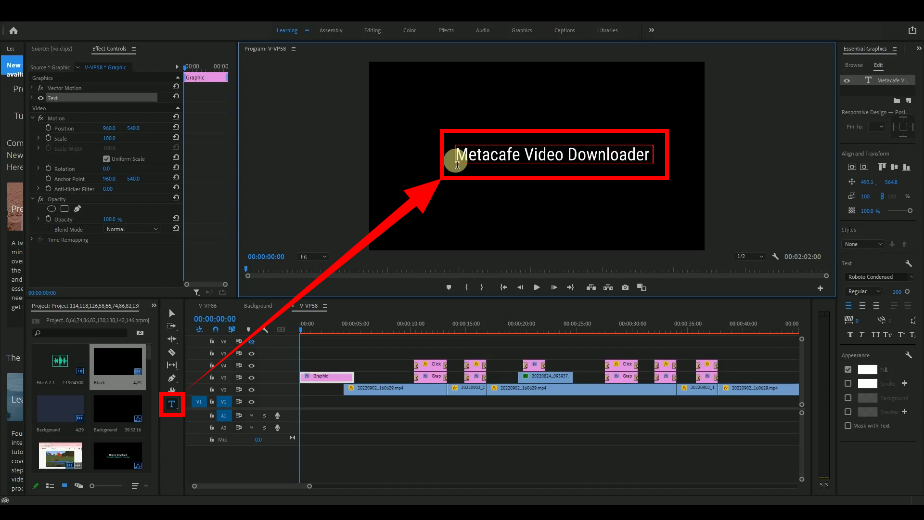
add title, add text title to the video

1.2. Change the font size and set the title’s position to the center.
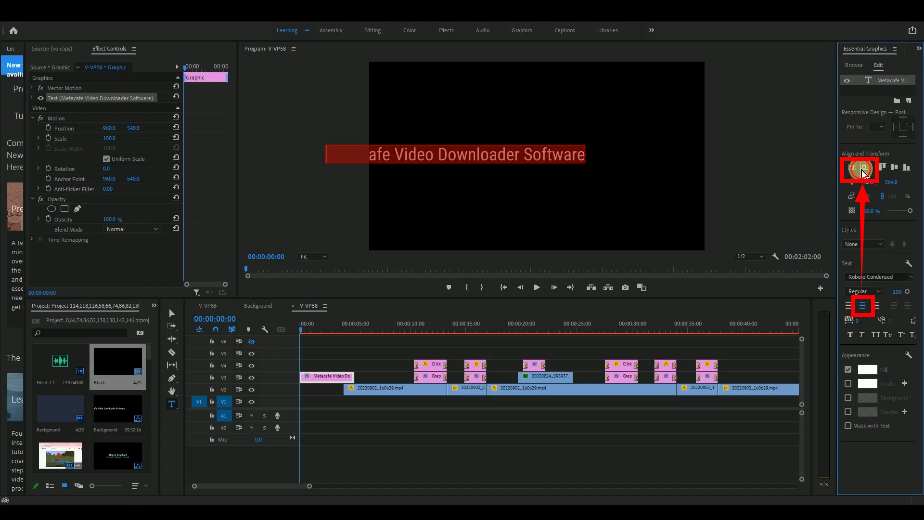
add title, change size and position

1.3. Trim/cut the title layer to fit in the video.
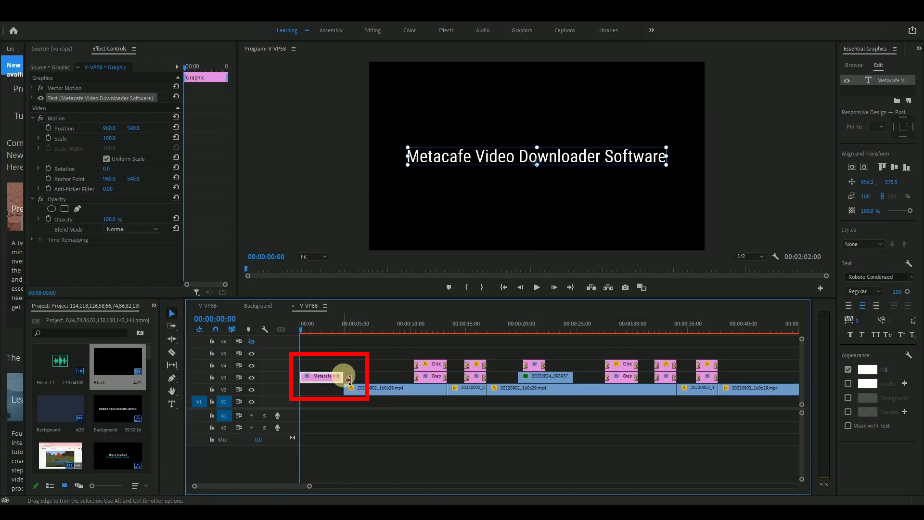
add title, trim or cut the title layer

Step 2: Add Chapter/Method title background

Move your timeline to the next Chapter/Method of the video.

3.1. Hold press the “Alt” on your keyboard and drag it to the right side.
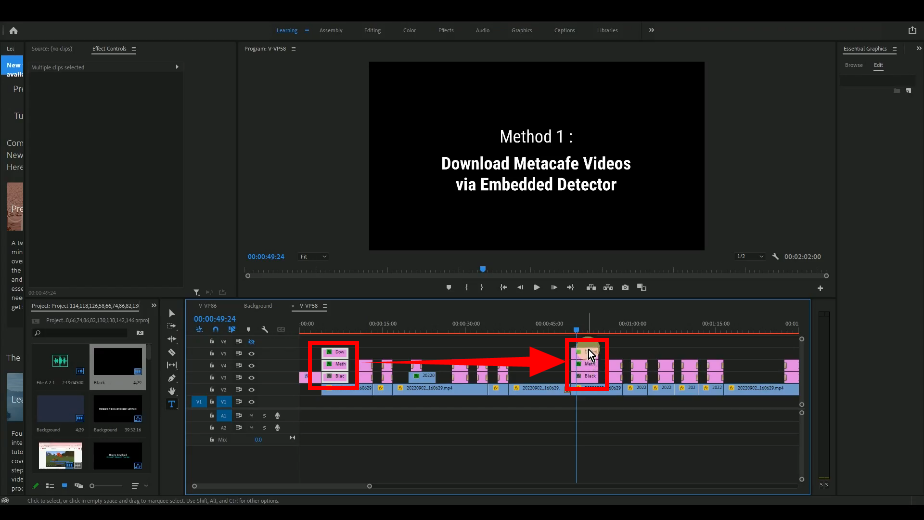
add chapter title, duplicate the chapter title

3.2. Change the Chapter/Method title of the duplicated layer.
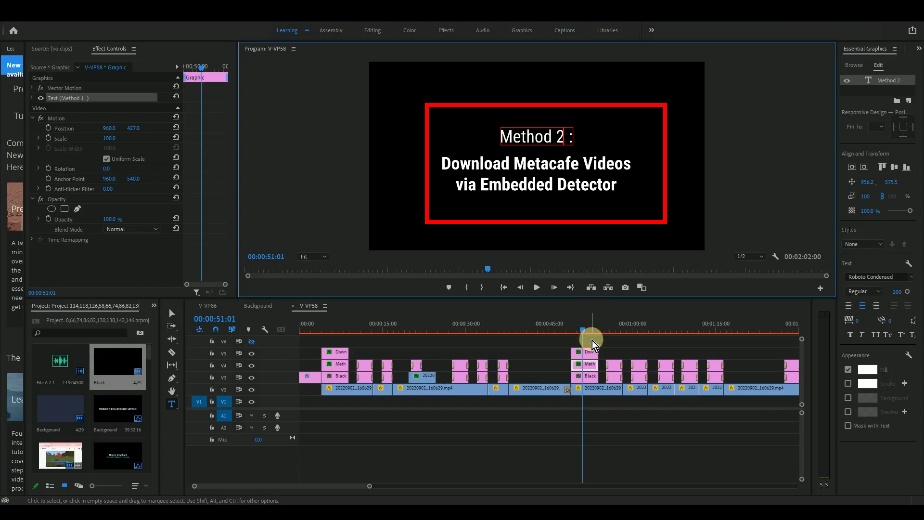
add chapter title, change the chapter title of the duplicated layer

Layer Management Rule:

  • Stick with the same layer for the same type of object.
  • Do not mix the same type of object among different layers. This rule applies for highlights objects as well.

Example:
Subtitle: 1 layer of text, 1 layer for rectangle, if necessary, add 1 layer for title-text such as “method 1” like in this video.

Highlight objects: 1 layer for rectangle and another layer for talk bubble.

Video Download
Record
Convert

videopower red icon

VideoPower
RED

  • Download video and audio from over 1000 video site
  • Batch download YouTube playlist
  • Record screen and audio with real-time annotation
  • Trim, crop, rotate video with a strong video editor
  • Windows 7, 8, 8.1, 10, 11 (32/64bits)

> DOWNLOAD <
LEARN MORE

Record Screen&Audio
Annotation, Schedule
Video Edit&Convert

videopower green icon

VideoPower
GREEN

  • Record screen and audio with real-time annotation
  • Create a scheduled task to record screen and webcam
  • Enrich your recorded video by powerful Video Editor
  • Capture and annotate your screen in the picture
  • Windows 7, 8, 8.1, 10, 11 (32/64bits)

> DOWNLOAD <
LEARN MORE

Video Convert
Slideshow Maker
Video Collage

videopower blue icon

VideoPower
BLUE

  • Convert video to various formats at super fast speed without quality loss

  • Make your own video clips or movies with fantastic themes
  • Transform multiple videos and photos in one frame as a collage
  • Trim, crop, rotate, effect, watermark, etc. video editing

  • Windows 7, 8, 8.1, 10, 11 (32/64bits)

> DOWNLOAD <
LEARN MORE

Music Search
Download
Record

videopower yellow icon

VideoPower
YELLOW

  • Records music and audio from various sources in lossless

  • Search and download music

  • Auto-add music ID3 tags for recorded music

  • ID3 Tag Identifier and Editor, Audio Editor/Converter, CD Ripper/Burner, Transfer to iTunes, etc

  • Windows 7, 8, 8.1, 10, 11 (32/64bits)

> DOWNLOAD <
LEARN MORE

ZEUS Series
VideoPower brother products, start easier with more affordable prices!

ZEUS FREE DOWNLOAD for Windows
ZEUS BUNDLE
1 Year License
$59.97 50%OFF
⇒ $29.99

Add to Cart

ZEUS BUNDLE
LITE
1 Year License
$39.97 50%OFF
⇒ $19.99

Add to Cart

ZEUS RECORD
LITE
1 Year License
$19.97 50%OFF
⇒ $9.98

Add to Cart

ZEUS DOWNLOAD LITE
1 Year License
$19.95 50%OFF
⇒ $9.98

Add to Cart

Screen Recorder Screen&Audio Recording
Duration Setting, Schedule Recording
Video Downloader Paste URL to download, batch download
Search/download video,browser detector
Music Recorder Record music and get music ID3 tag info
Music search/download/record, CD Ripper/Creator, Audio Editor
Video Editor Edit and convert videos, create slideshow
Screen Capture Capture screen, image editor

Whatever fits your needs,it’s here.
Which one would you choose?

> VideoPower Series Comparison <


