











Besides having a great audio recorder, the software contains simple but handy tools such as download, a library for music, search, and radio.
Let’s discuss the in-depth features of the product.
Record
The main feature of this software is the audio recording. You can access this by clicking on record (1).
Pressing (2) will turn on and turn off audio recording, (3) will pause the recording, you can press it again to continue recording, (4) will allow you to play existing recordings, (5) allows you to to the next recording track. (6) is the volume control, (7) changes audio input/source. You can choose from a variety of options:
- System sound – the sound coming from the computer will be recorded.
- Microphone – the sound received by the computer’s microphone or an external microphone will be recorded.
- System and microphone – the sound from the computer and the one received by the microphone will be recorded.
Clicking (8) will allow you to change the recorded audio’s format. Take note: You have to set the format first before recording to see the effect take place.
(9) allows you to schedule the recording to your desired time and date.

Library
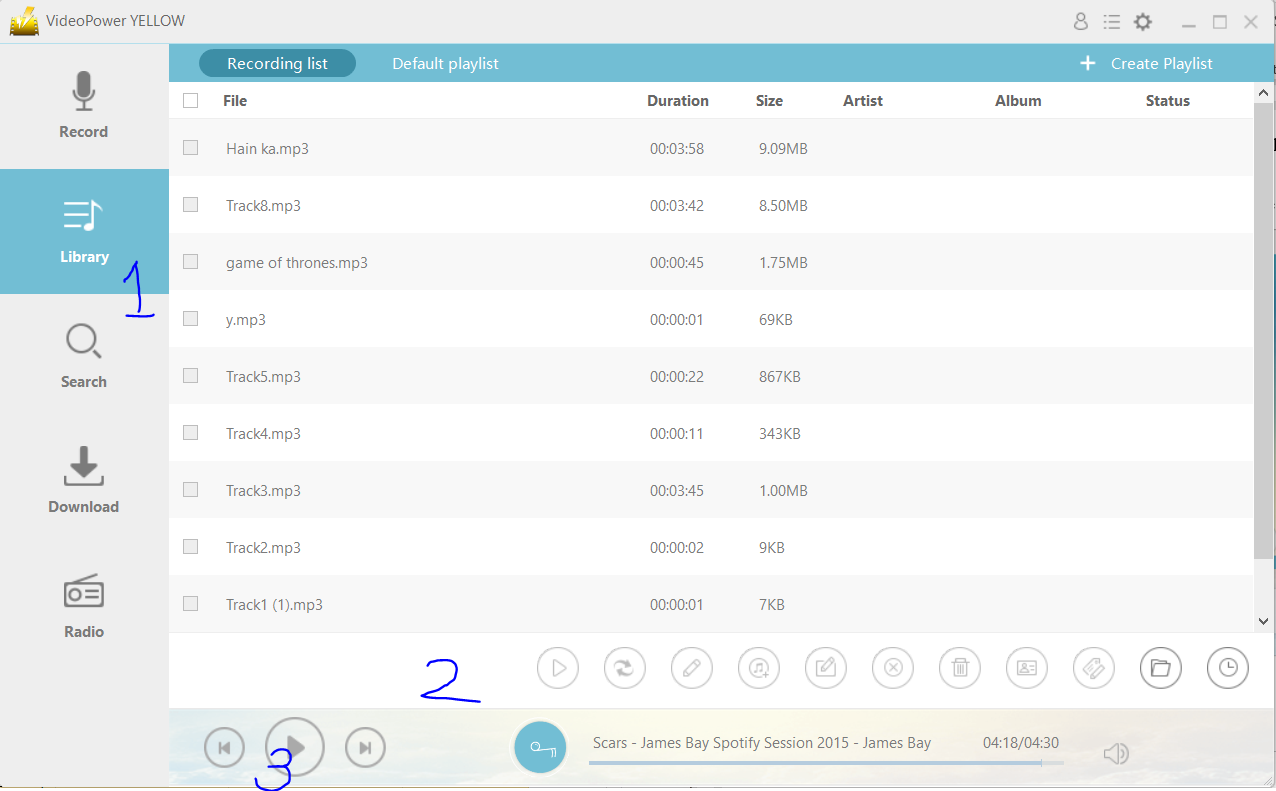
The library feature for this software can be accessed by clicking on (1).
In (2) there are a couple of functions that you can use. From left to right:
1. Play function – plays the audio.
2. Convert – you can convert the recorded files to your desired format.
3. Edit – provides basic audio editing.
4. Add to iTunes – you can add the selected audio to iTunes.
5. Rename – change the name of the audio file.
6. Remove – you can remove the selected audio file.
7. Delete – deletes the item completely.
8. Identify
9. ID3 Tag editor
10. Open folder – opens the directory folder for the audio files.
11. Create task – you can schedule a task.
(3) Functions for the audio such as play, last track and next track.
Search
This is by far the most unique feature for an audio recording software out there. Through this feature, you can input any song that you want to hear and the software will automatically detect the audio.
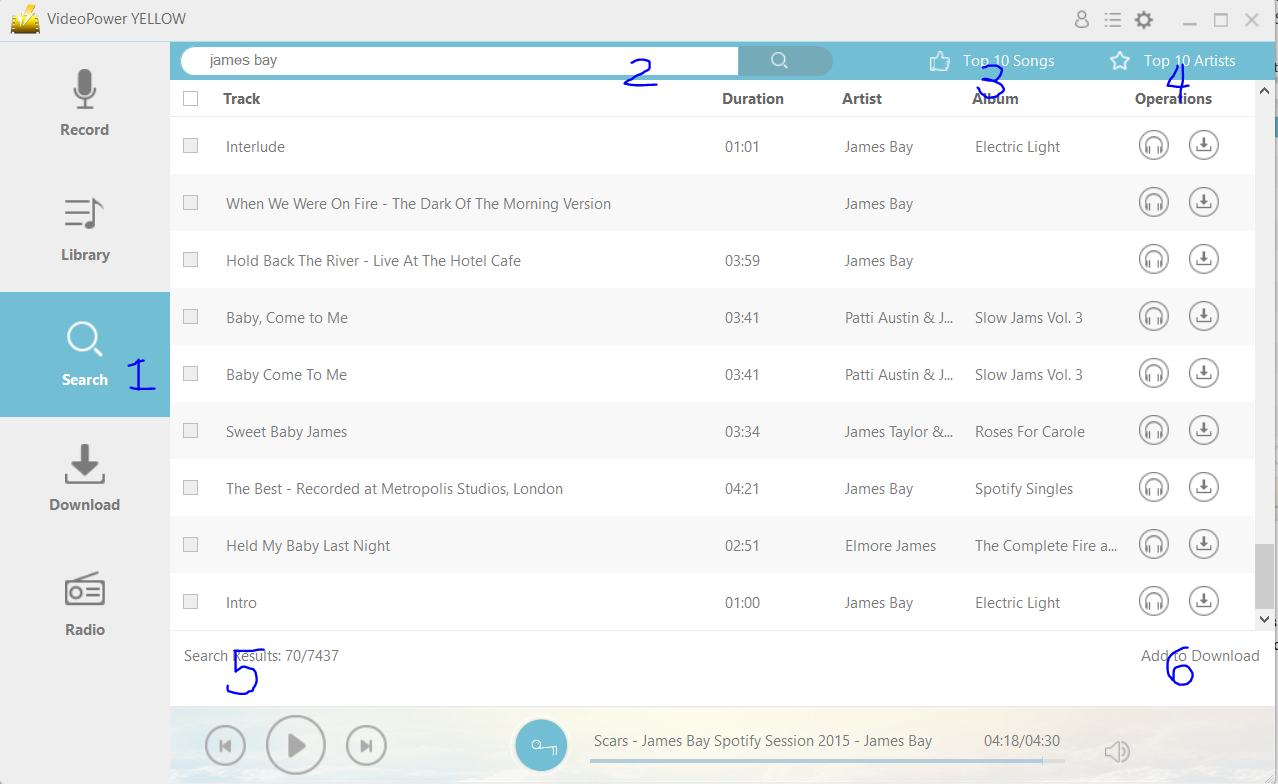
You can access this by clicking on (1).
(2) you can search the song on the search bar. Clicking (3) will show you the top 10 songs and (4) will show you the top 10 artists. I’m not really certain where this list comes from though.
(5) Will show you more results of what you searched. (6) will add the selected audio to be downloaded automatically.
Download
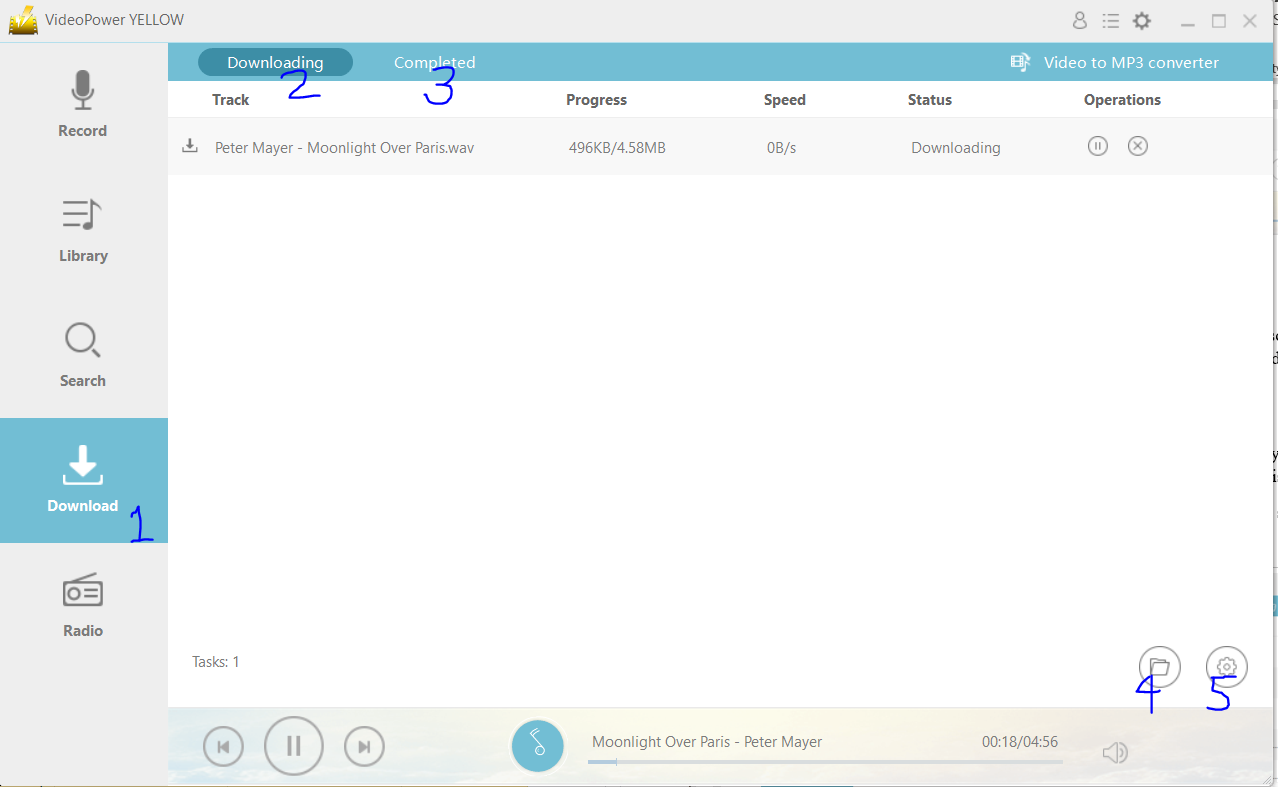
This feature allows you to download any audio file from the internet. You can access this by clicking on (1)
(2) shows you the files currently being downloaded while (3) shows the files that are downloaded.
(4) allows you to access the directory folder for the downloads and (5) allows you to access the settings.
Radio
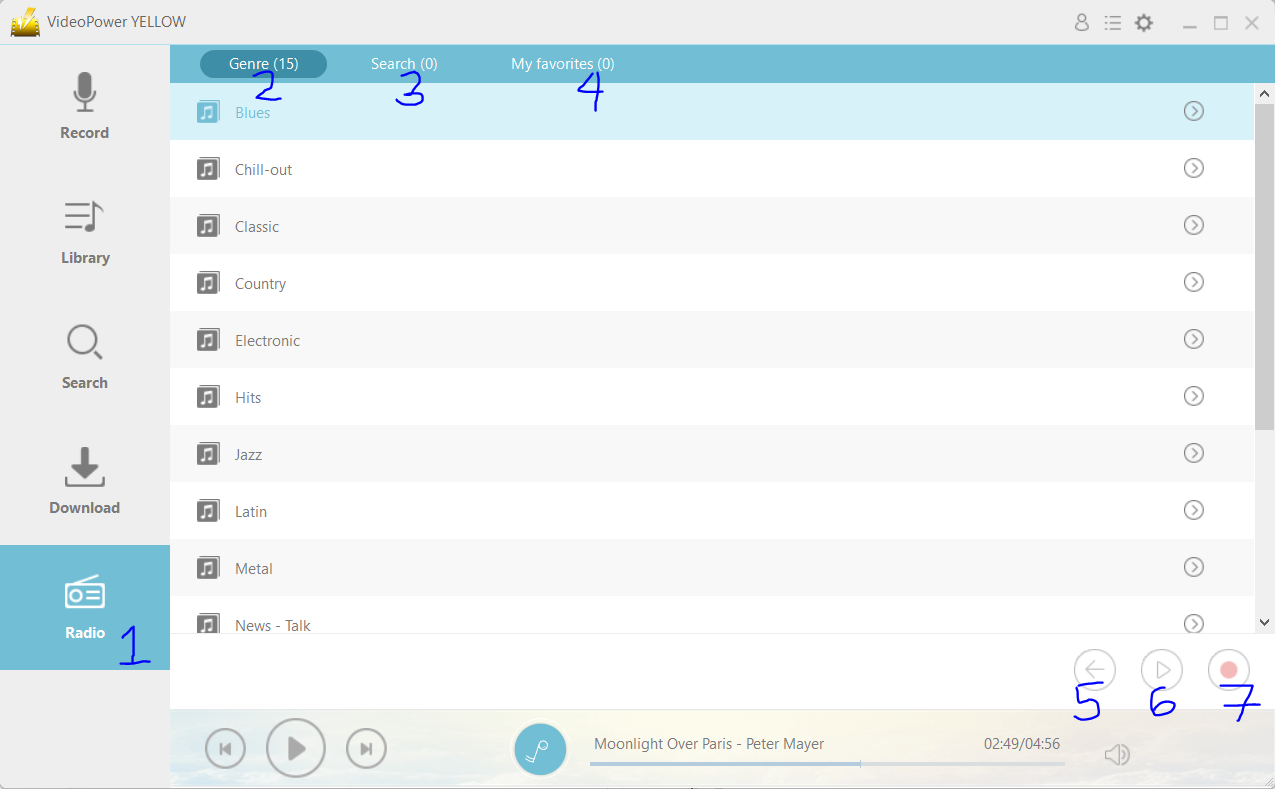
Another unique feature of this software is the radio option. You can access this by clicking on (1).
(2) allows you to have an overview of available genres for the radio, (3) allows you to use the search function, and (4) allows you to save your favorites.
(5) is back, (6) is play, and (7) allows you to record the station that you’re currently listening to.
Other bonus features
By clicking on the encircled icon below, you can access a variety of bonus features that come with the software.
1. Audio editing – this special function offers basic editing tools such as audio trimming, merging, etc.
2. Audio converter – you can convert audio files into your selected format.
3. Transfer music to iTunes
4. Video to MP3 converter
5. ID3 Tag editor
6. ID3 Tag identifier
7. CD Burner
8. CD Ripper
9. Schedule task

Settings
You can change the settings by clicking on the encircled icon below. You can modify the settings for the audio recording, download, and the general settings.

Language
You can choose from a wide array of languages programmed into the software.
User Guide
This opens into a webpage where there is an instructional manual for the software.
FAQ
This opens into a webpage where there are Frequently Asked Questions.
Help
You can access support for the software.
Check for updates
You can check for updates of the software’s latest version.
About
This opens into a webpage where you can learn more about the software.
In conclusion, the VideoPower YELLOW is a simple and powerful tool that allows users to easily record, edit, and download audio.




ZEUS Series
VideoPower brother products, start easier with more affordable prices!
| ZEUS BUNDLE 1 Year License ⇒ $29.99 |
ZEUS BUNDLE LITE 1 Year License ⇒ $19.99 |
ZEUS RECORD LITE 1 Year License ⇒ $9.98 |
ZEUS DOWNLOAD LITE 1 Year License ⇒ $9.98 |
||
| Screen Recorder | Screen&Audio Recording | ✔ | ✔ | ✔ | |
| Duration Setting, Schedule Recording | ✔ | ||||
| Video Downloader | Paste URL to download, batch download | ✔ | ✔ | ✔ | |
| Search/download video,browser detector | ✔ | ||||
| Music Recorder | Record music and get music ID3 tag info | ✔ | ✔ | ||
| Music search/download/record, CD Ripper/Creator, Audio Editor | ✔ | ||||
| Video Editor | Edit and convert videos, create slideshow | ✔ | |||
| Screen Capture | Capture screen, image editor | ✔ | |||