











Brief Introduction of MP3
The MP3 format means MPEG Audio Layer 3. Early 1990’s when it was developed and after 3 years, it was released. MPEG deals with both audio and video and how they are compressed or manipulated in order to obtain a desirable balance between size and quality while MP3 deals only with audio, specifically, lossy audio files that became very popular at the beginning of portable music players which were commonly referred to as MP3 players.
Thanks to the small size and high quality of MP3, this format has become a synonym for online music.
Advantage of MP3
They are incredibly popular with users because the audio files are compressed to about one-tenth of the original size. For this reason, the MP3 file takes up very little disk space and is quick to download. Don’t worry because this file format could deliver audio that is almost CD quality.
It has great compatibility that can be played on both Windows and macOS. It is still used today for audio, especially songs and audiobooks.
The best MP3 format converter
Below is the step-by-step guide on how to convert video/audio files to MP3 format.
VideoPower BLUE or ZEUS, are powerful converters that can convert MP3 format sounds and music. that supports many video formats with video editing function, enables adding subtitles, apply watermarks, make MV and split-screen videos.
Due to its wide array of formats to choose from, VideoPower BLUE is the best converter out there.
You can try to use the software for free by downloading its trial version below.
ZEUS can do what VideoPower series can do and more with an almost similar interface.
Check out NOW! Start easier with more affordable prices!
Convert MP3 using VideoPower BLUE
Step 1: Add the audio file
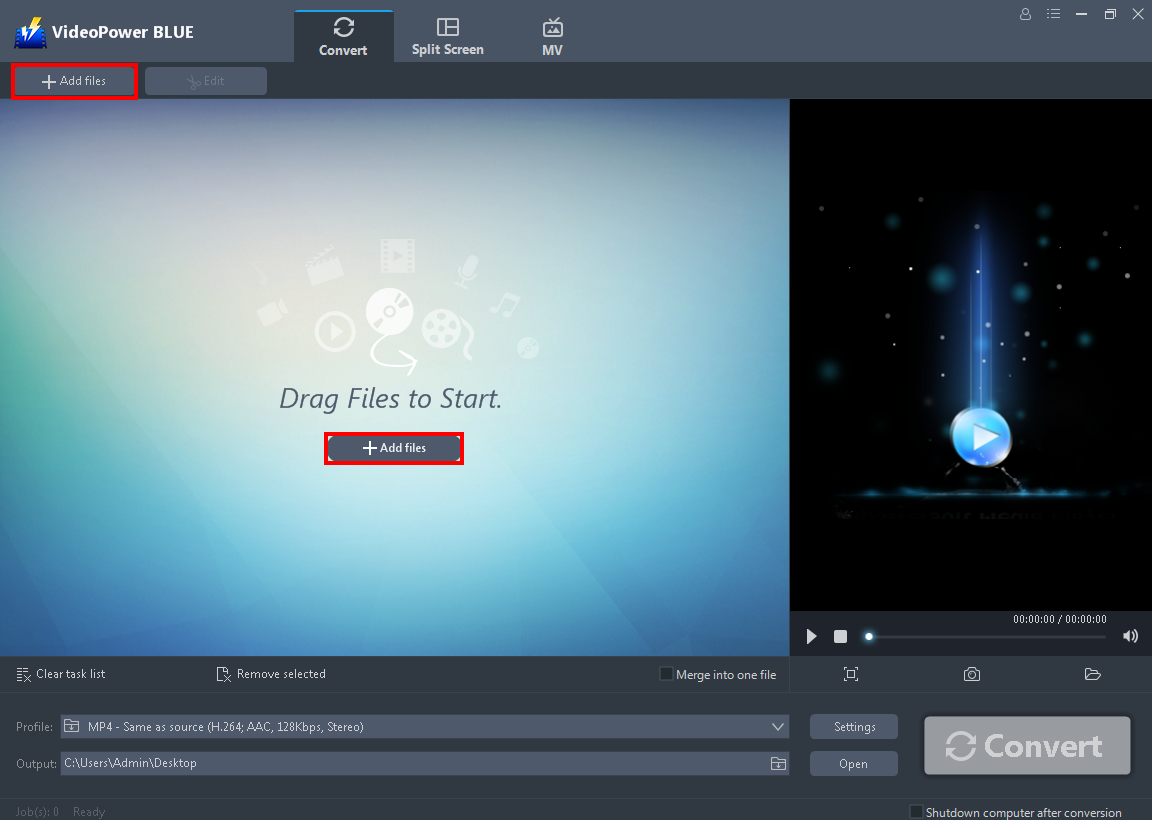
Launch VideoPower BLUE. Directly import the audio file to the software by clicking the “+ Add files” button or by drag-and-drop the file to the interface.
Step 2: Edit the audio before converting
Note: This step is optional. If users opt to edit the file before conversion then follow through this step. If users do not wish to edit the audio, they may go directly to Step 3.
2. 1 Open the editor
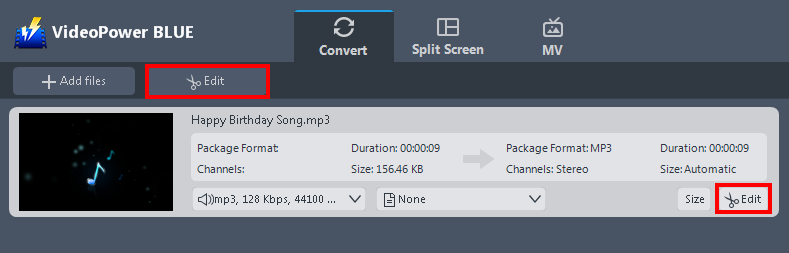
The imported audio file is displayed in the list. Click the “Edit” button on the right side of the file to open the audio editor.
2.2 Edit the audio
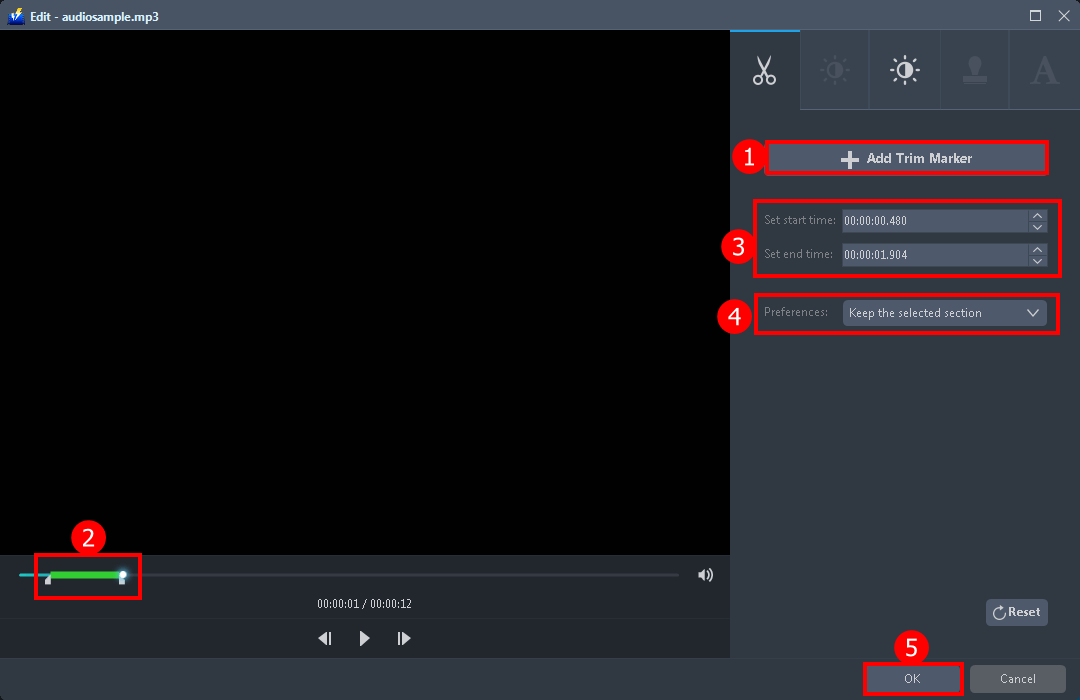
The built-in video editor will pop up, with its help, you can trim or cut your audio.
1. Click “Add Trim Marker”.
2. Drag the mark as shown below to select the part you want to cut.
If you want to select multi-sections, please repeat 1 and 2.
3. Set the start and end time.
4. Choose the “Keep the selected section” or “Delete the selected section” from “Preferences”.
5. Click “OK” to save the setting.
Step 3: Select output format for conversion
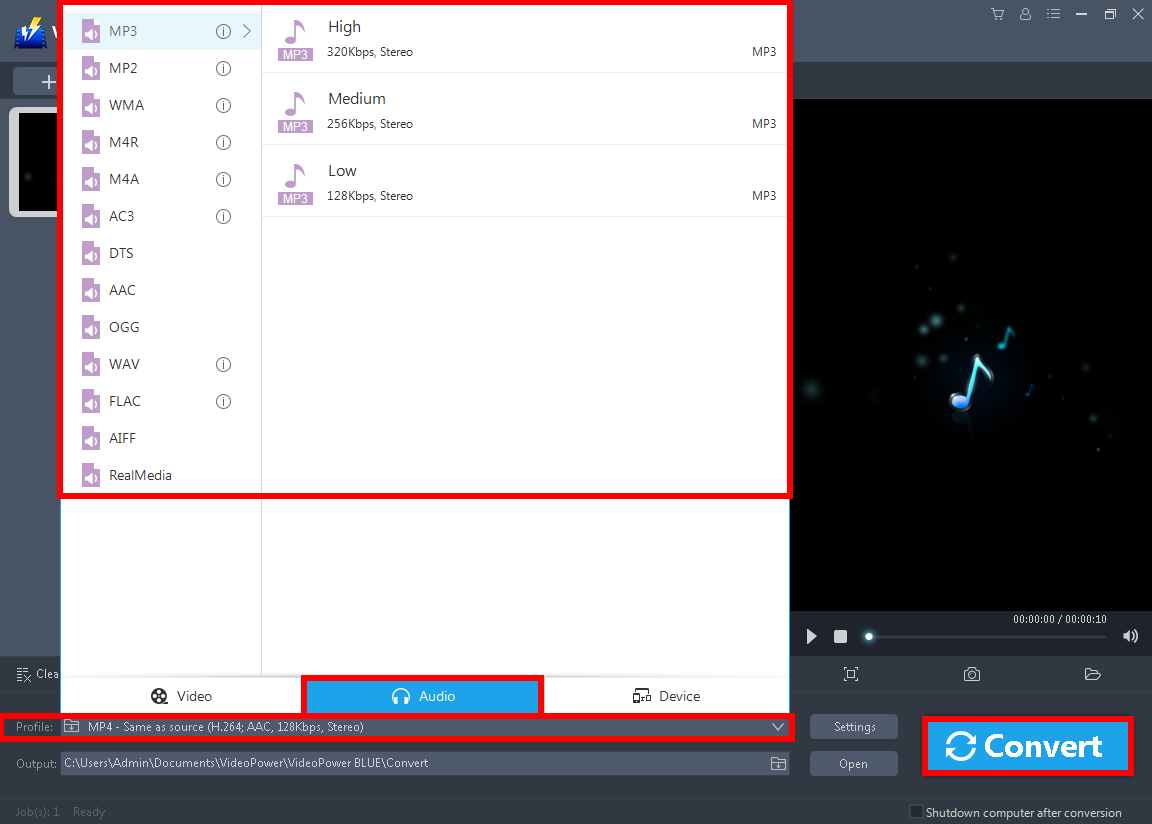
1. Click the “Profile” drop-down button.
2. Navigate to “Audio” to see all the audio formats.
3. Select the format you want to convert to.
4. Then click the big “Convert” button to save the file.
A pop-up window from the program will appear informing you that the conversion is complete. Click “OK” to open the folder of your saved converted audio files.
Conclusion:
Converting files to MP3 is not a bad idea at all, especially if it’s a compatibility issue.
VideoPower BLUE is definitely perfect for you. It’s fast and flexible with a built-in video editor that will enable you to merge multiple videos into one single file. This software will allow you to edit slideshows or videos, apply watermarks, effects, and other basic video editing options such as trimming or cropping. Moreover, it has a split-screen tool for your photos and videos.
ZEUS series can do everything that VideoPower series can do and more, the interface is almost the same.
Check out NOW! Start easier with more affordable prices!
convert to mp3 format, convert video to mp3 format, convert mp4 to mp3 format factory, convert mp4 to mp3 format, convert mpeg to mp3 format, convert m4a to mp3 format, convert mp4 to mp3 format online, convert video to mp3 format online, convert video to mp3 format factory, convert jpg to mp3 format




ZEUS Series
VideoPower brother products, start easier with more affordable prices!
| ZEUS BUNDLE 1 Year License ⇒ $29.99 |
ZEUS BUNDLE LITE 1 Year License ⇒ $19.99 |
ZEUS RECORD LITE 1 Year License ⇒ $9.98 |
ZEUS DOWNLOAD LITE 1 Year License ⇒ $9.98 |
||
| Screen Recorder | Screen&Audio Recording | ✔ | ✔ | ✔ | |
| Duration Setting, Schedule Recording | ✔ | ||||
| Video Downloader | Paste URL to download, batch download | ✔ | ✔ | ✔ | |
| Search/download video,browser detector | ✔ | ||||
| Music Recorder | Record music and get music ID3 tag info | ✔ | ✔ | ||
| Music search/download/record, CD Ripper/Creator, Audio Editor | ✔ | ||||
| Video Editor | Edit and convert videos, create slideshow | ✔ | |||
| Screen Capture | Capture screen, image editor | ✔ | |||