











Is it possible to extract audio from the MP4 video and how? Have you ever watched a video and really like the song or audio track? Maybe, you don’t know the title of the music and can’t find it on the Internet. So what will you do?
If you have a video and you only need the audio, extracting the audio through file conversion is the way.
There is a brilliant step to extract audio from MP4 without knowing any information about the soundtrack.
Here we will use VideoPower BLUEor ZEUS to help us do this job.
It is a great software that has multiple features and functions such as video and audio conversion and basic video editing. This software can extract audio from MP4 by converting the video file into an MP3 format. It is one of the most intelligent audio extractors and provides high-quality results.
You can try to use the software for free by downloading its trial version below.
ZEUS can do what VideoPower series can do and more with an almost similar interface.
Check out NOW! Start easier with more affordable prices!
How to Extract audio from MP4 Video on Windows
Step 1: Import MP4 files to the program
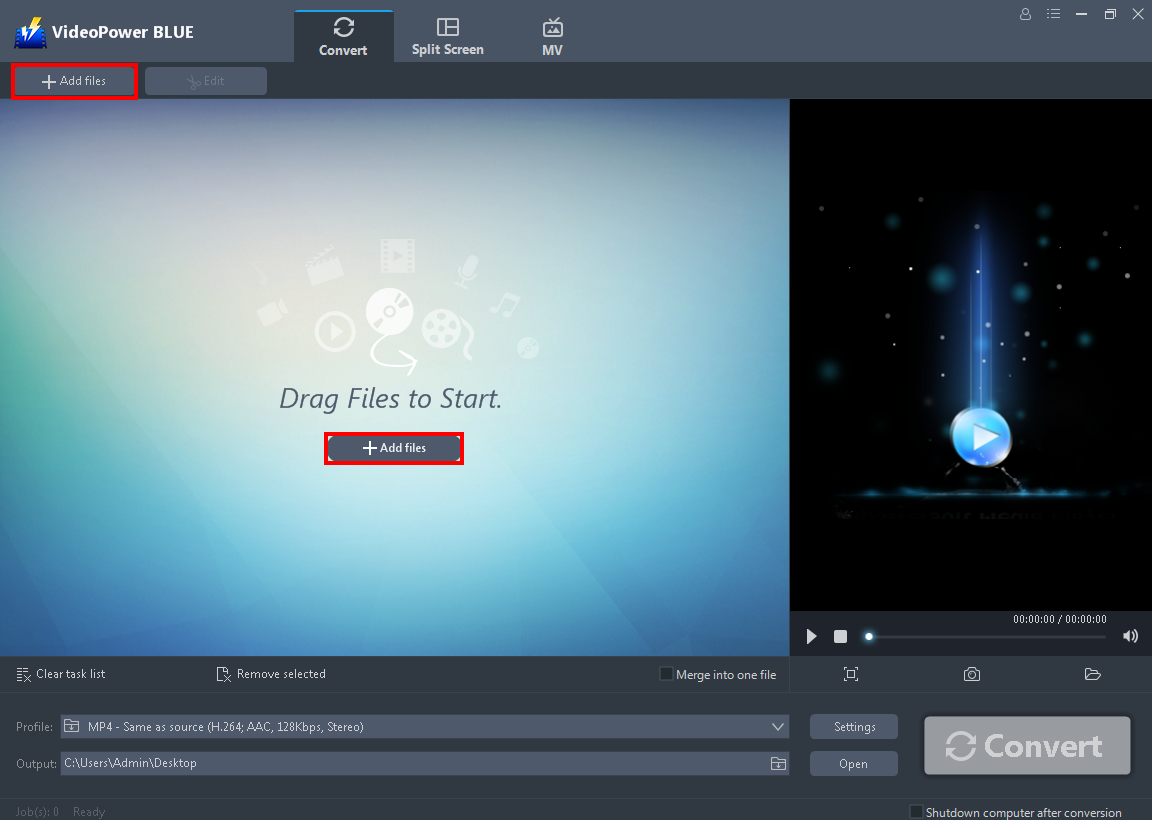
After you launch the program, upload the video you want to get the audio. Just click the “+ Add files” or drag and drop the mp4 video.
Step 2: Select audio format from the output profile list
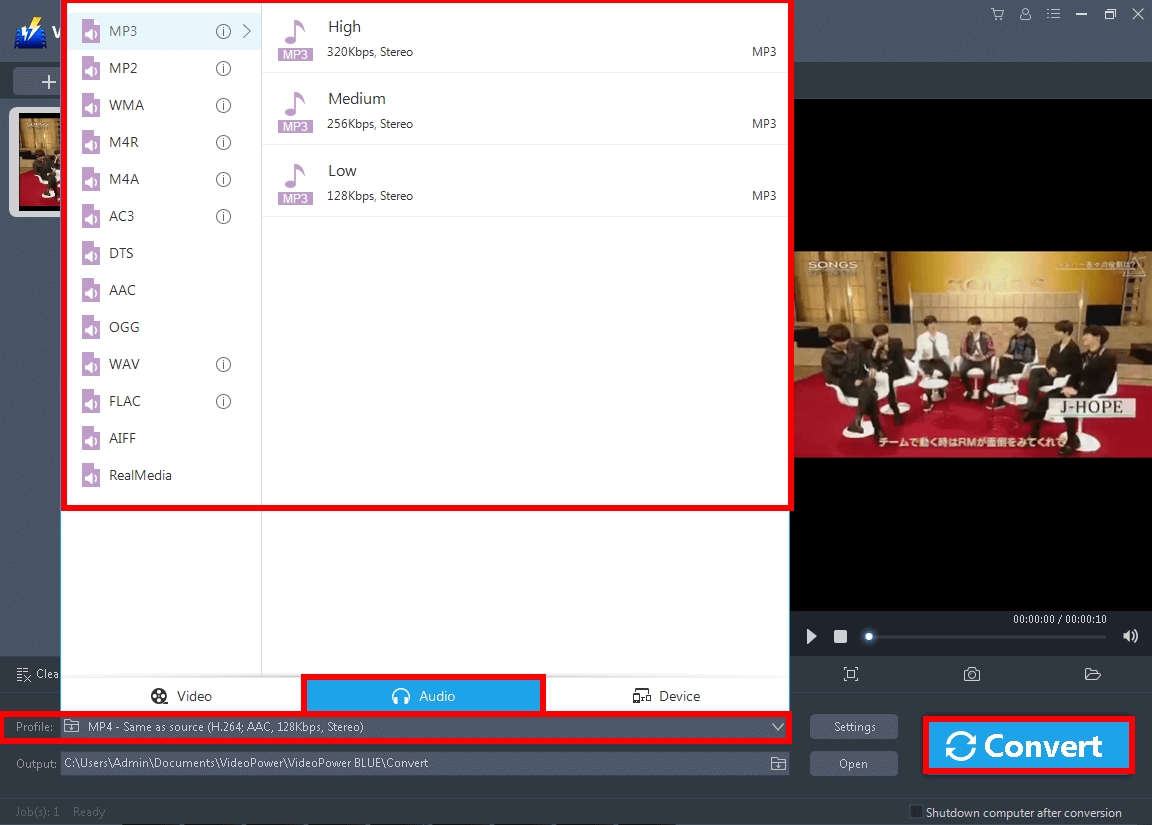
Click the “Profile” button. Go to the “Audio” section and choose an audio format you preferred. Click the “Convert” button if you are done.
The program will pop up a window to inform you once the conversion is completed. Click “OK” to open the folder where the file is located.
Conclusion:
Extracting audio from MP4 on windows 10, 7, 8, and 8.1 is made easy by VideoPower BLUE without sacrificing the quality of your extracted file.
VideoPower BLUE is definitely perfect for you. It’s fast and flexible with a built-in video editor that will enable you to extract audio from a video file. Not only that, but you can also edit slideshows or videos, apply watermarks, effects, and other basic video editing options such as trimming or cropping. Moreover, it has a split-screen tool for your photos and videos to make a collage and merge multiple audio and video into one file.
ZEUS series can do everything that VideoPower series can do and more, the interface is almost the same.
Check out NOW! Start easier with more affordable prices!
extract audio from mp4 online, extract audio from mp4 audacity, extract audio from mp4 video, extract audio from mp4 mac, extract audio from mp4 ffmpeg, extract audio from mp4 vlc, extract audio from mp4 windows, extract audio from mp4 windows 10, extract audio from mp4 android, extract audio from mp4 python




ZEUS Series
VideoPower brother products, start easier with more affordable prices!
| ZEUS BUNDLE 1 Year License ⇒ $29.99 |
ZEUS BUNDLE LITE 1 Year License ⇒ $19.99 |
ZEUS RECORD LITE 1 Year License ⇒ $9.98 |
ZEUS DOWNLOAD LITE 1 Year License ⇒ $9.98 |
||
| Screen Recorder | Screen&Audio Recording | ✔ | ✔ | ✔ | |
| Duration Setting, Schedule Recording | ✔ | ||||
| Video Downloader | Paste URL to download, batch download | ✔ | ✔ | ✔ | |
| Search/download video,browser detector | ✔ | ||||
| Music Recorder | Record music and get music ID3 tag info | ✔ | ✔ | ||
| Music search/download/record, CD Ripper/Creator, Audio Editor | ✔ | ||||
| Video Editor | Edit and convert videos, create slideshow | ✔ | |||
| Screen Capture | Capture screen, image editor | ✔ | |||