











ASF is an abbreviation of Advanced Streaming Format, a streaming multimedia file format developed by Microsoft for Windows 98.
Like JPG and MPG files, ASF files are also a file type, but they are especially suitable for transmission over IP networks.
ASF is a data format that includes audio, video, image, and control command scripts.
The ASF file can be used to implement video-on-demand functions, live broadcast functions, and distance education.
However, not all media players can open the ASF file. So it’s not a bad idea to convert it to the MP4 format, the most common video file format.
I recommend you to download and enjoy using the best video converter you’ll ever find on the internet called VideoPower BLUE.
VideoPower BLUE or ZEUS is great software with a variety of options and features including screen capture and recording, editing, music, and file format conversion that can convert ASF to MP4.
You can try to use the software for free by downloading its trial version below.
ZEUS can do what VideoPower series can do and more with an almost similar interface.
Check out NOW! Start easier with more affordable prices!
Step 1: Add the ASF file to convert it to MP4
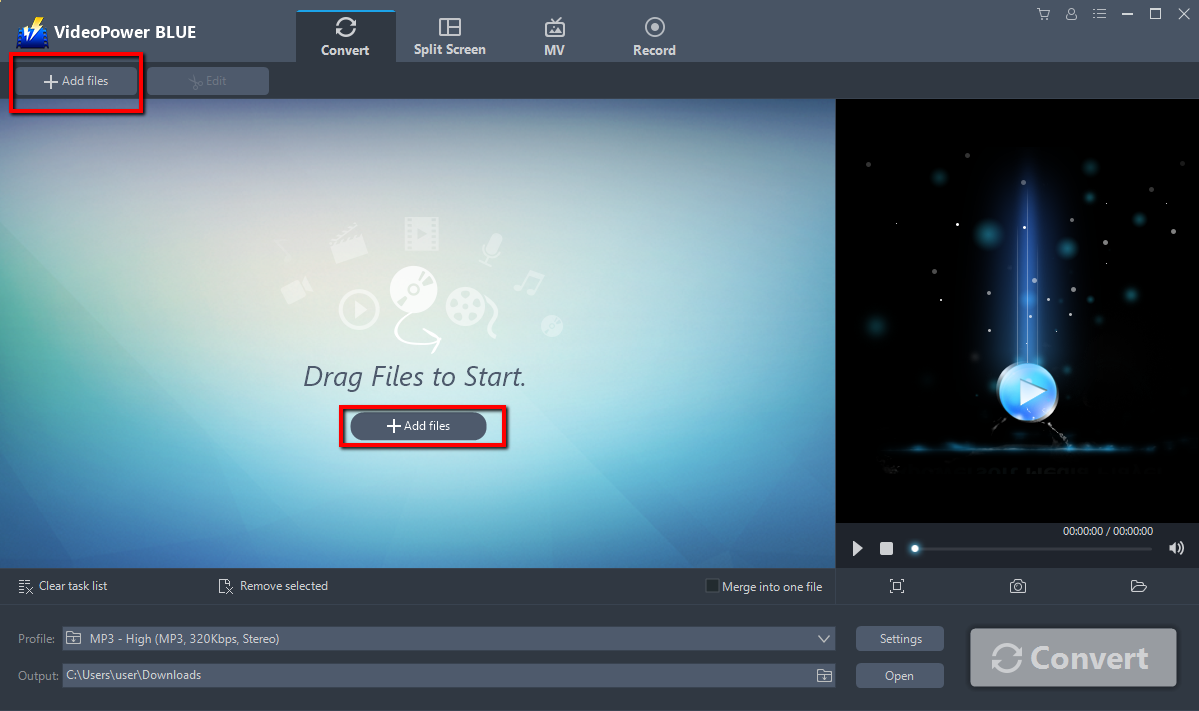
You can directly import the ASF file to the program by clicking the “Add files” button or by drag-and-drop to the interface.
Step 2: Edit ASF file before conversion
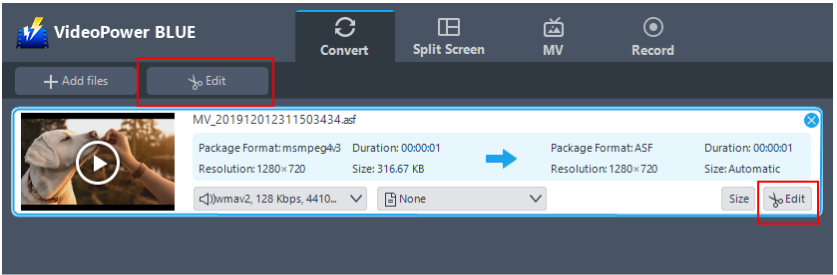
If you need to edit your ASF file before converting to MP4, click the “Edit” button on top or on the right side of the file.
The built-in video editor will pop up, with its help, you can make the perfect movie. Adjust speed and volume, trim, cut, crop, rotate or flip videos. Add effects, subtitles, and watermark while adjusting brightness, contrast, and saturation that will make editing conveniently easier.
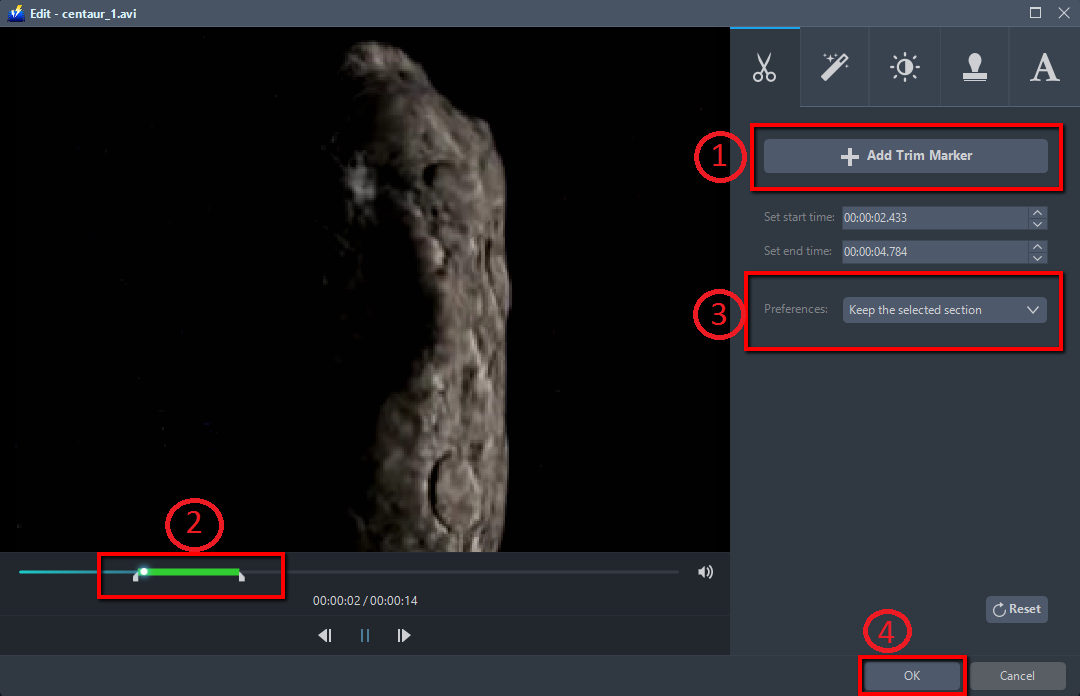
For example, you can trim your video as shown below:
1) Click “Add Trim Marker”.
2) Drag the mark as shown below to select the part you want to cut.
If you want to select multi-sections, please repeat 1 and 2.
3) Choose “Keep the selected section” or “Delete the selected section” from “Preferences”.
4) Click “OK” to save the setting
Step 3: Convert ASF to MP4 format
3.1 Set the output format
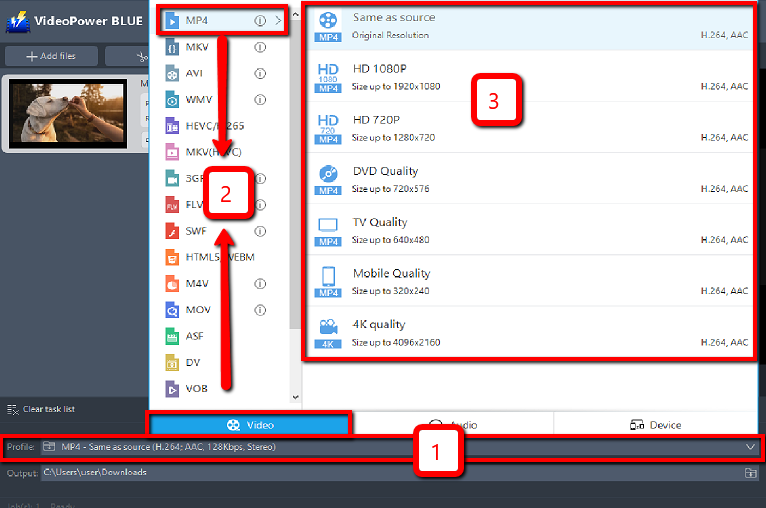
1) Click to open the “Profile” drop-down menu, then choose the format you want from the profile list.
2) Here you can click “Video” and then “MP4”.
3) You may now choose the quality you prefer.
3.2 Start converting ASF to MP4
Return to the file list.
Click the “Convert” button, then the converted file will be saved in the default output folder.
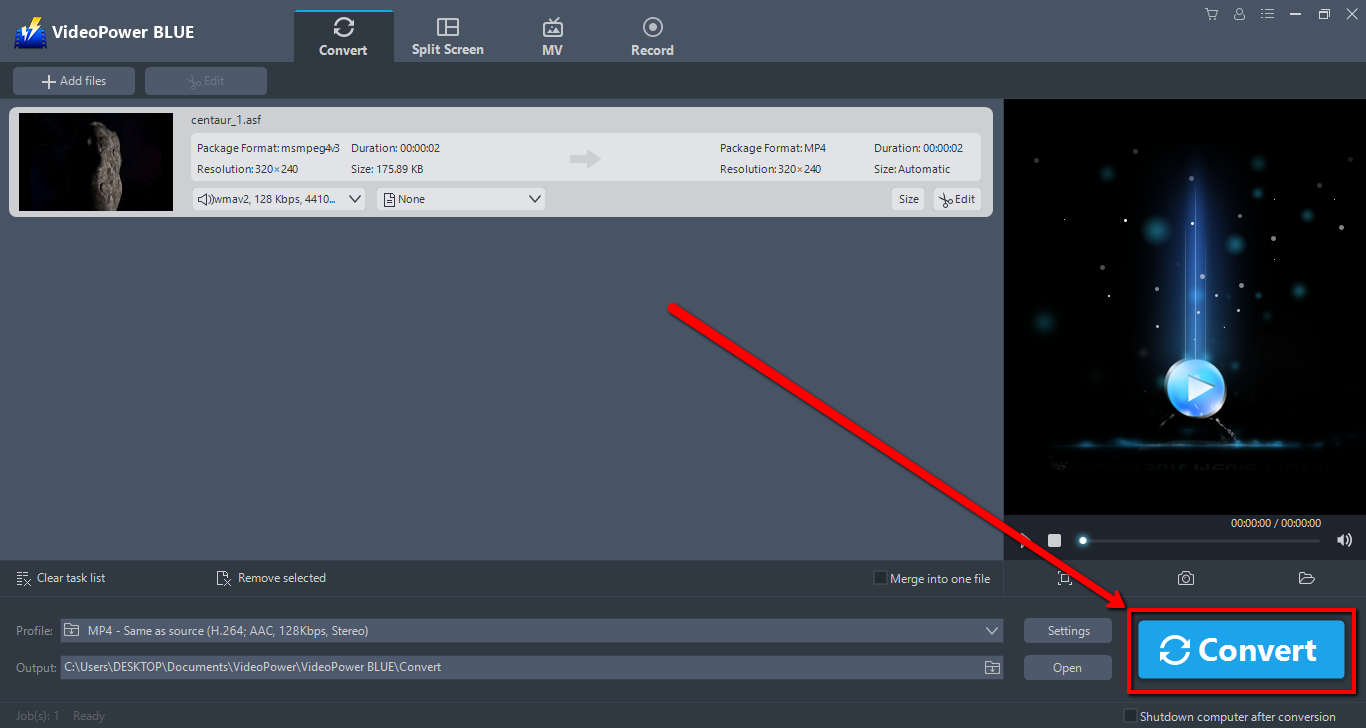
3.3 Find the Converted file(s)
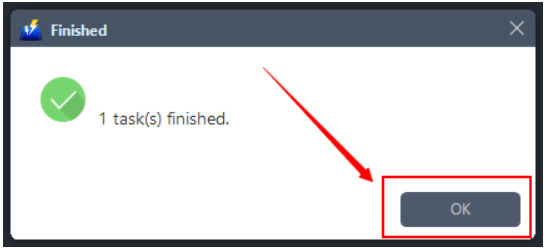
The program will pop up a window to inform you once the conversion is completed. Click “OK” to open the folder of your saved converted MP4 files.
Conclusion:
MP4 is smaller in file size without sacrificing both audio and video quality that’s why it’s hailed as the kind of file formats. Additionally, MP4 is more flexible than ASF because it can be played on a wide variety of gadgets.
VideoPower BLUE, a powerful converter that supports any video formats. It’s fast and flexible with a built-in video editor that will enable you to merge multiple videos into one single file. This software will allow you to edit slideshows or videos, apply watermarks, effects, and other basic video editing options such as trimming or cropping. Moreover, it has a split-screen tool for your photos and videos and a screen recorder which allows you to capture any on-screen activity on your computer.
ZEUS series can do everything that VideoPower series can do and more, the interface is almost the same.
Check out NOW! Start easier with more affordable prices!
convert asf to mp4 mac, convert asf to mp4 windows 10, convert asf to mp4 with vlc, convert asf to mp4 online, convert asf to mp4 online free, convert asf to mp4 free, convert asf to mp4 ffmpeg, convert asf to mp4 free software, convert asf to mp4 offline




ZEUS Series
VideoPower brother products, start easier with more affordable prices!
| ZEUS BUNDLE 1 Year License ⇒ $29.99 |
ZEUS BUNDLE LITE 1 Year License ⇒ $19.99 |
ZEUS RECORD LITE 1 Year License ⇒ $9.98 |
ZEUS DOWNLOAD LITE 1 Year License ⇒ $9.98 |
||
| Screen Recorder | Screen&Audio Recording | ✔ | ✔ | ✔ | |
| Duration Setting, Schedule Recording | ✔ | ||||
| Video Downloader | Paste URL to download, batch download | ✔ | ✔ | ✔ | |
| Search/download video,browser detector | ✔ | ||||
| Music Recorder | Record music and get music ID3 tag info | ✔ | ✔ | ||
| Music search/download/record, CD Ripper/Creator, Audio Editor | ✔ | ||||
| Video Editor | Edit and convert videos, create slideshow | ✔ | |||
| Screen Capture | Capture screen, image editor | ✔ | |||