











Watching videos on the Internet is a great way to let time pass. A steady and fast internet connection is a luxury but what if your internet is not that reliable? You might be enjoying binge-watching that favorite program and suddenly the video gets blurry and buffering then you might regret that you are not watching it offline instead.
VideoPower RED or ZEUS is capable of downloading videos from various browsers from all browsers such as Internet Explorer, Google Chrome, Firefox, Safari, Opera, etc. So no matter what browser you use to play online streaming videos, you can download it using this software and with the right browser free video downloader of your choice. After the video has been saved in your local drive then there is no need to suffer from delays or to buffer.
Perhaps you’ve done some research online and found that video downloader chrome or web-based downloader is not much reliable and bear some drawbacks because an unstable connection results to unreliable output so this goes without saying, a desktop program is much more dependable.
VideoPower RED a video downloader professional has more features than other downloaders. This software is a video downloader helper good for people who are unfamiliar with downloader tools it is also not limited to downloading videos from your browsers but also provides all available formats of video for conversion including formats MP4, 3GP, FLV, WMV, MP3, WEBM, MOV, etc. which is better for device compatibility issues. So I must say that VideoPower RED is the best video downloader.
ZEUS can do what VideoPower series can do and more with an almost similar interface.
Check out NOW! Start easier with more affordable prices!
Method 1: Copy and Paste Video URL to Download
Step 1: Copy and Paste Video URL from Website
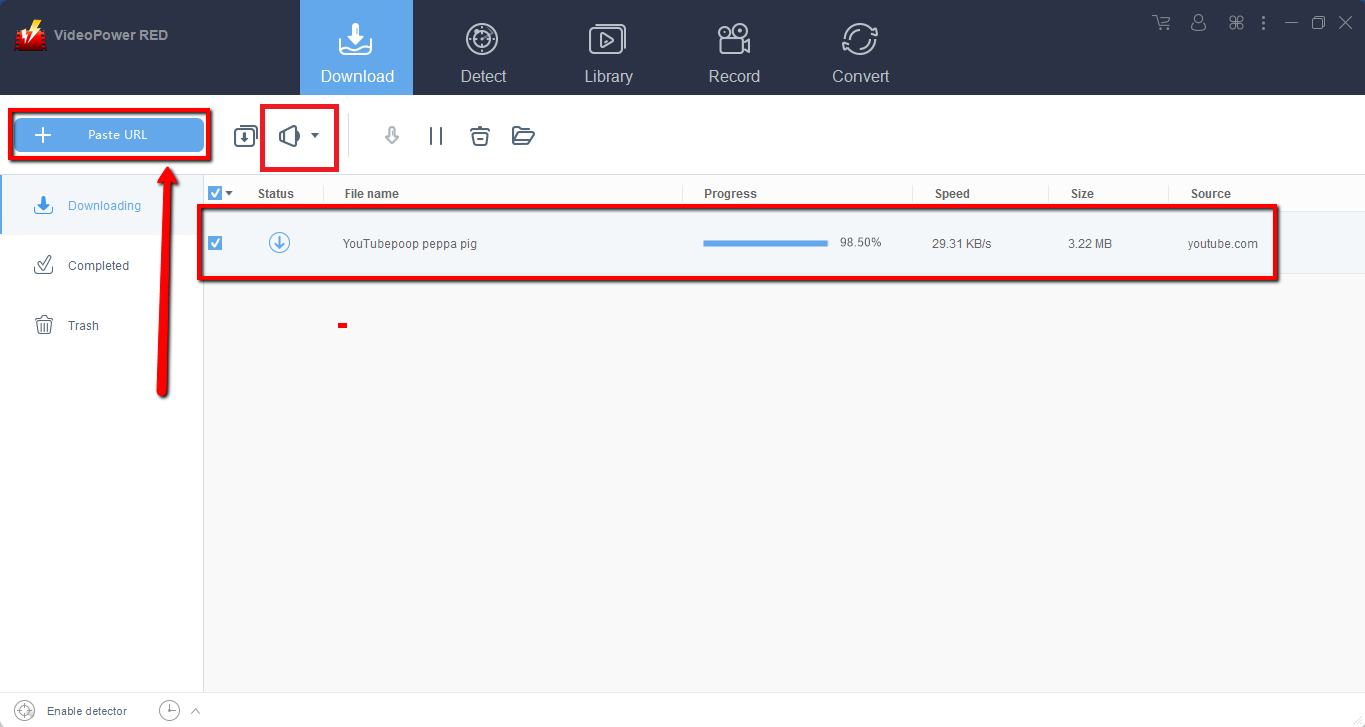
Copy the link of the selected video file from the video streaming website that you want to download and then paste it on the program by clicking the “Paste URL” button.
After doing this, the video will be processed in the “Downloading” section where you can track the progress.
Step 2: Check the Downloaded Video from Website
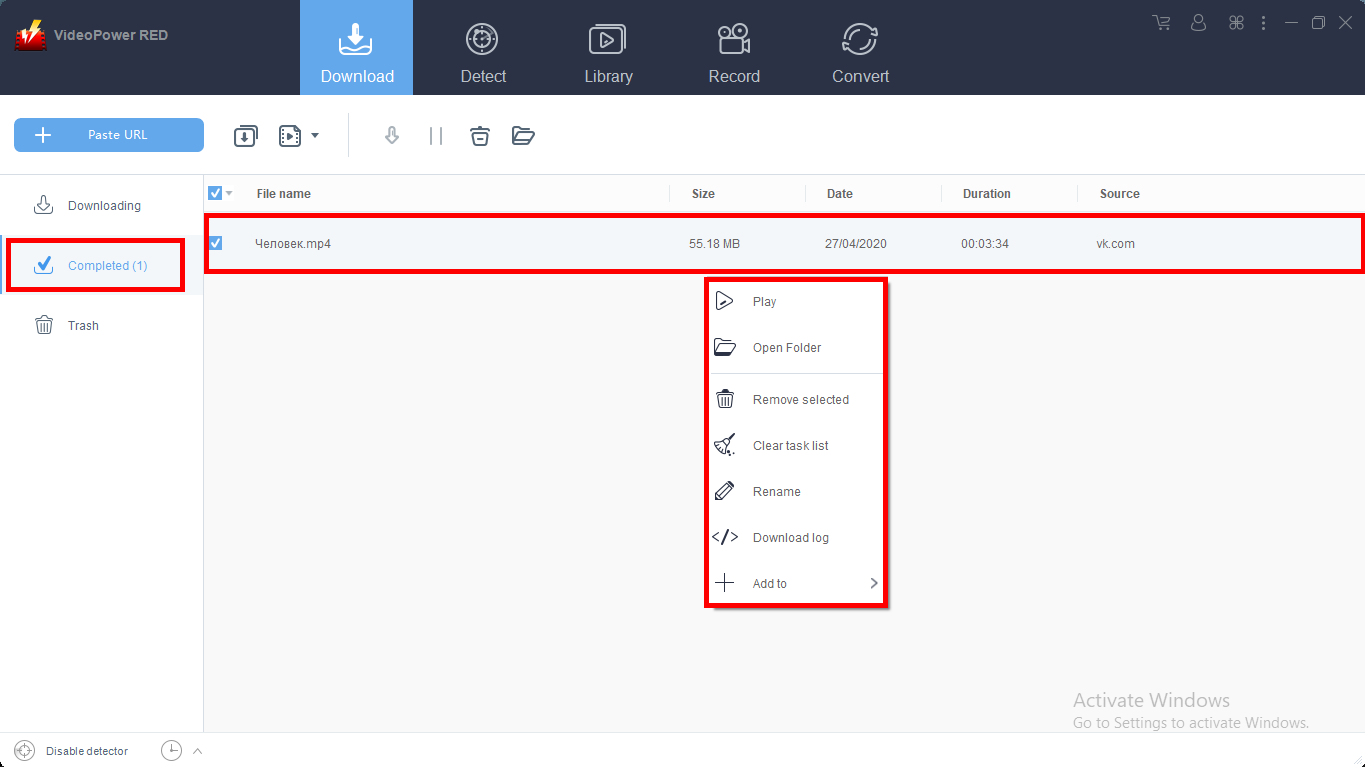
Wait for the download process to finish, and then go to the “Completed” section to find the downloaded video from Websites.
If you wish for video playback, conversion, or edit, right-click on the file name and choose among the options.
Method 2: Use the Embedded Browser to Download Video from Website
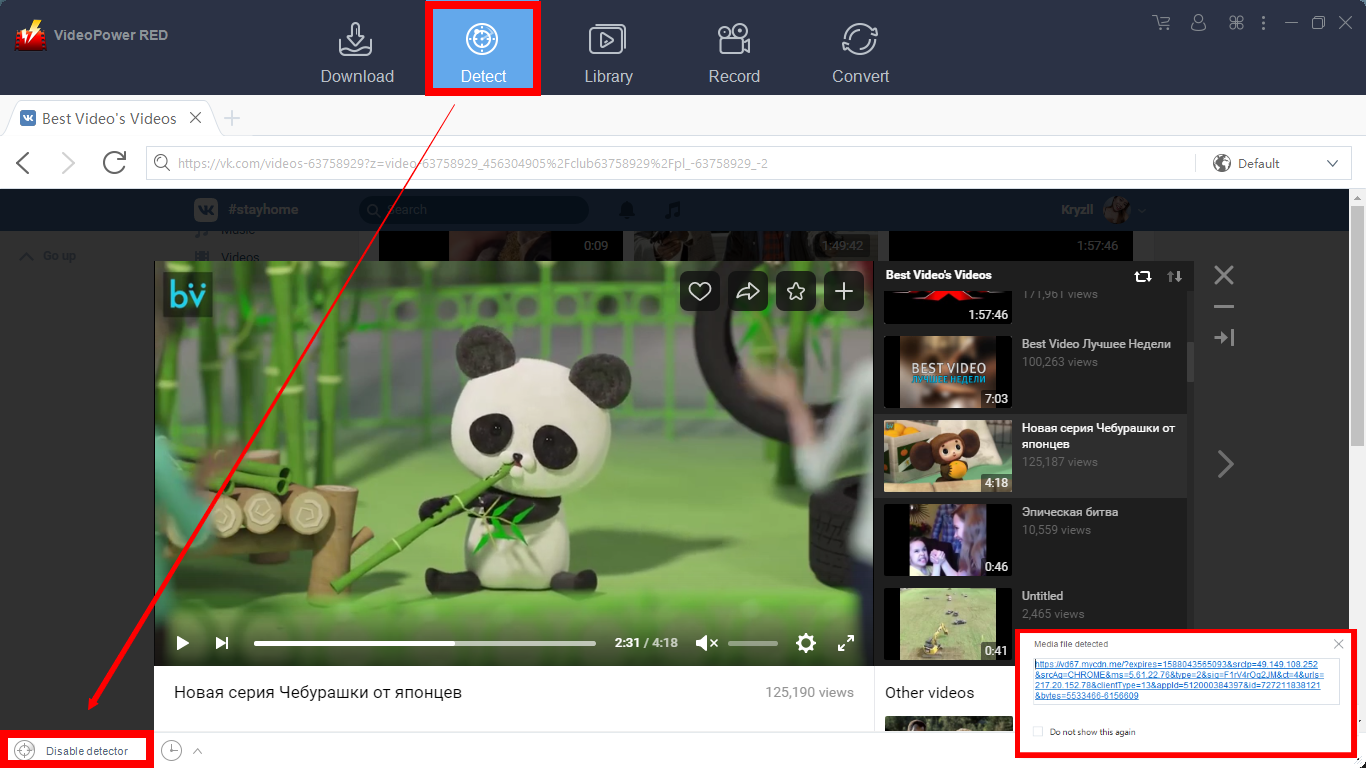
Open the streaming website using the embedded browser. Play the video you want to download and if the program supports the streaming site, the video will be downloaded automatically.
A pop-up prompt “Media file detected” will show to let you know that the program is downloading the video.
For YouTube site:
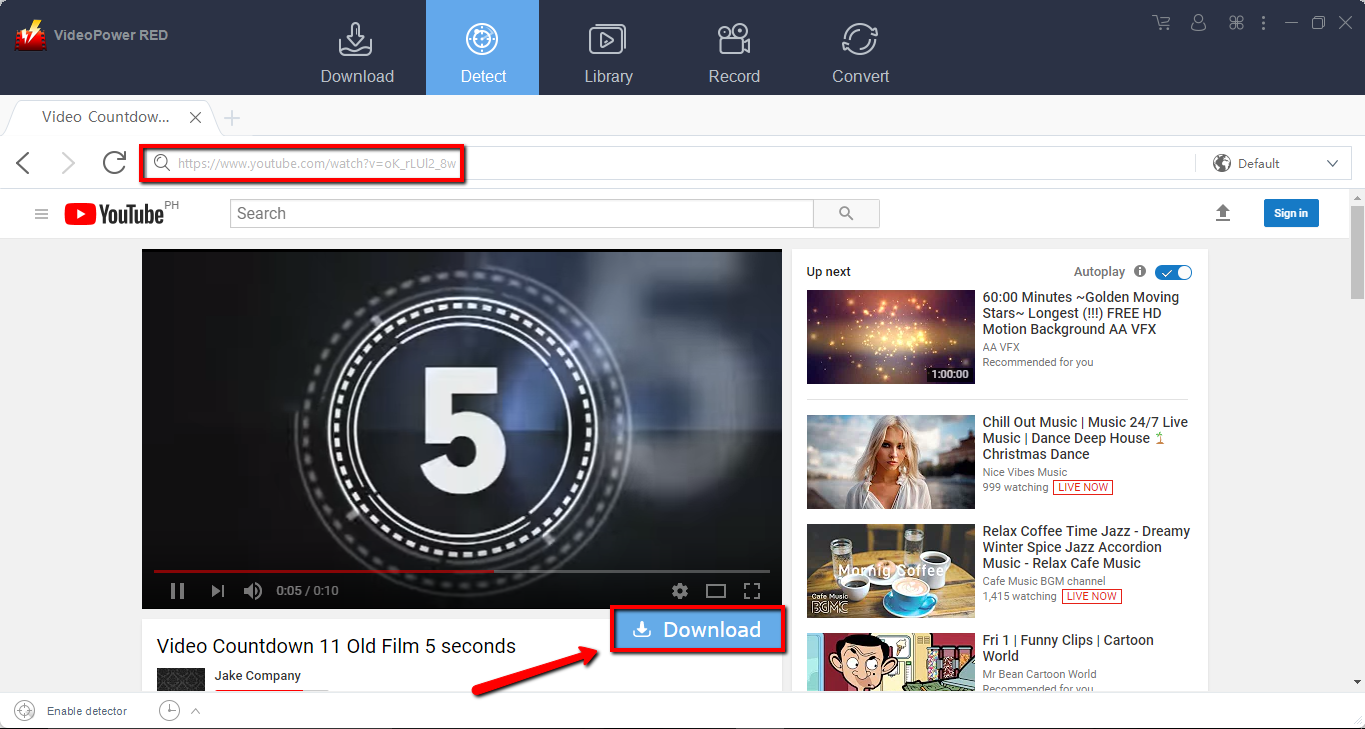
In downloading videos from YouTube, the video can be downloaded by clicking the “Download” button below the video.
Method 3: Download Online Video Using the External Detector
Step 1: Open Settings
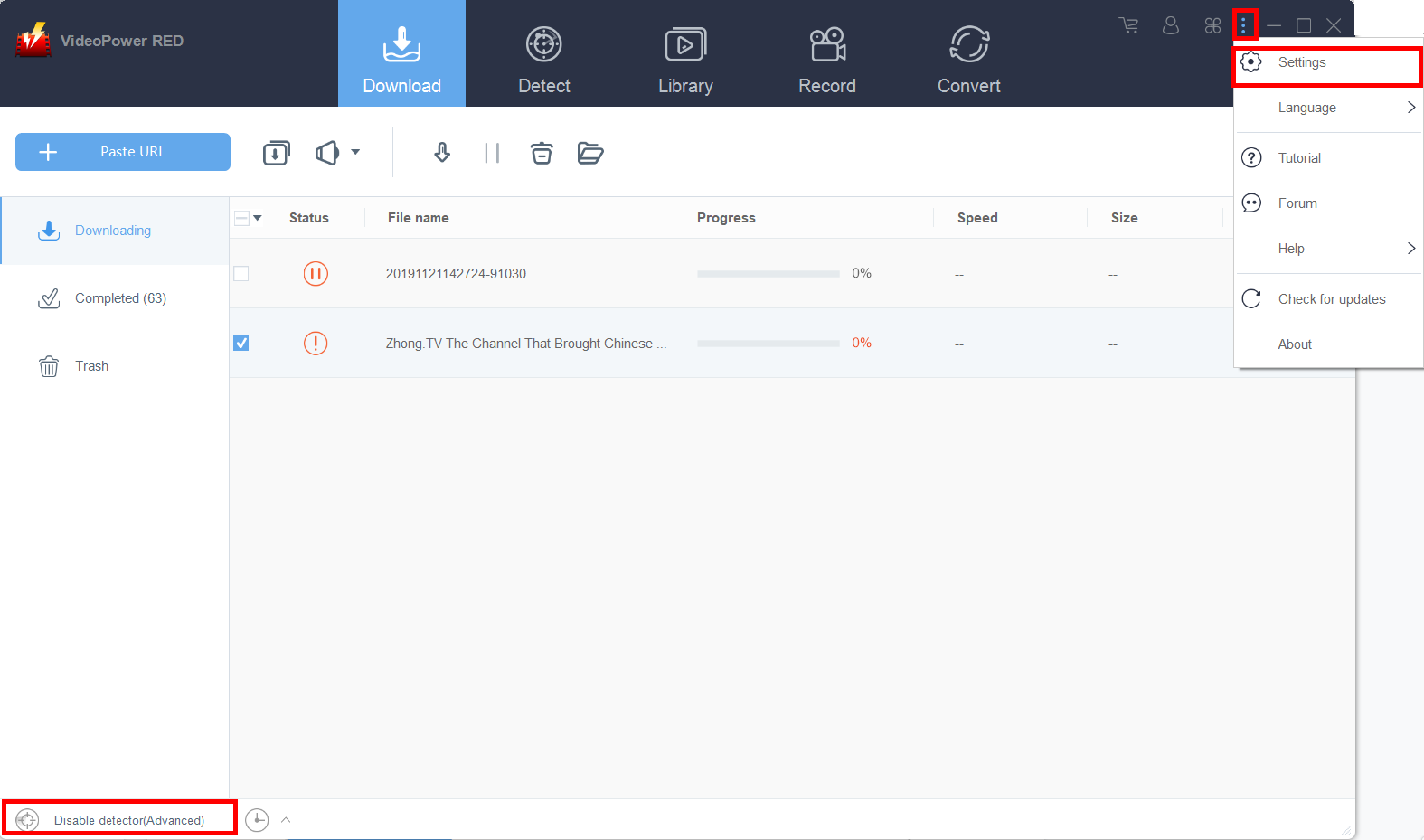
Click on the “Settings” button on the upper-right corner of the interface to open the settings.
Step 2: Enable the Advanced Detector to Download Videos
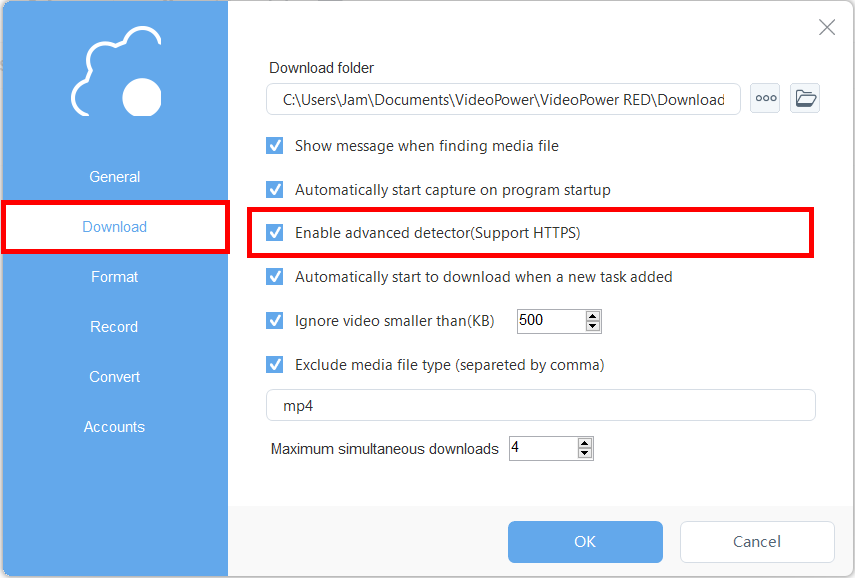
Set “Enable Advanced Detector” on the download settings. Click “OK” to save the changes made.
Then find the video that you want to download using your preferred browser, play the video, and the VideoPower RED software will detect and download the video automatically from that external source.
Conclusion:
VideoPower RED not limited to a downloader, it’s also a converter and video editor. It has a built-in video editor that will enable you to merge multiple videos into one single file. This software will allow you to edit slideshows or videos, apply watermarks, effects, and other basic video editing options such as trimming or cropping.
Moreover, it has a split-screen tool for your photos and videos and a screen recorder that allows you to capture any on-screen activity on your computer with audio.
Download VideoPower RED now to experience its full features
ZEUS series can do everything that VideoPower series can do and more, the interface is almost the same.
Check out NOW! Start easier with more affordable prices!




ZEUS Series
VideoPower brother products, start easier with more affordable prices!
| ZEUS BUNDLE 1 Year License ⇒ $29.99 |
ZEUS BUNDLE LITE 1 Year License ⇒ $19.99 |
ZEUS RECORD LITE 1 Year License ⇒ $9.98 |
ZEUS DOWNLOAD LITE 1 Year License ⇒ $9.98 |
||
| Screen Recorder | Screen&Audio Recording | ✔ | ✔ | ✔ | |
| Duration Setting, Schedule Recording | ✔ | ||||
| Video Downloader | Paste URL to download, batch download | ✔ | ✔ | ✔ | |
| Search/download video,browser detector | ✔ | ||||
| Music Recorder | Record music and get music ID3 tag info | ✔ | ✔ | ||
| Music search/download/record, CD Ripper/Creator, Audio Editor | ✔ | ||||
| Video Editor | Edit and convert videos, create slideshow | ✔ | |||
| Screen Capture | Capture screen, image editor | ✔ | |||