











JW Player is application software that streams different kinds of videos that users enjoy watching. JW is indeed amazing and satisfying in serving users their needs and wants with regards to streaming videos online. However, like other software, JW Player doesn’t have a downloading service for saving videos for offline purposes. Thus, a JW video downloader software is recommended.
VideoPower RED or ZEUS is a highly recommendable video downloading tool that enables you to download JW videos easily and efficiently. It also offers a variety of useful functions which makes the download easier and hassle-free.
ZEUS can do what VideoPower series can do and more with an almost similar interface.
Check out NOW! Start easier with more affordable prices!
Method 1: Copy and Paste URL to Download JW Videos
Step 1: Paste URL to download video

Copy the link of your selected video to download and paste it by clicking the “Paste URL” button. The video will then be processed under the “Downloading” tab.
Step 2: Check the downloaded task
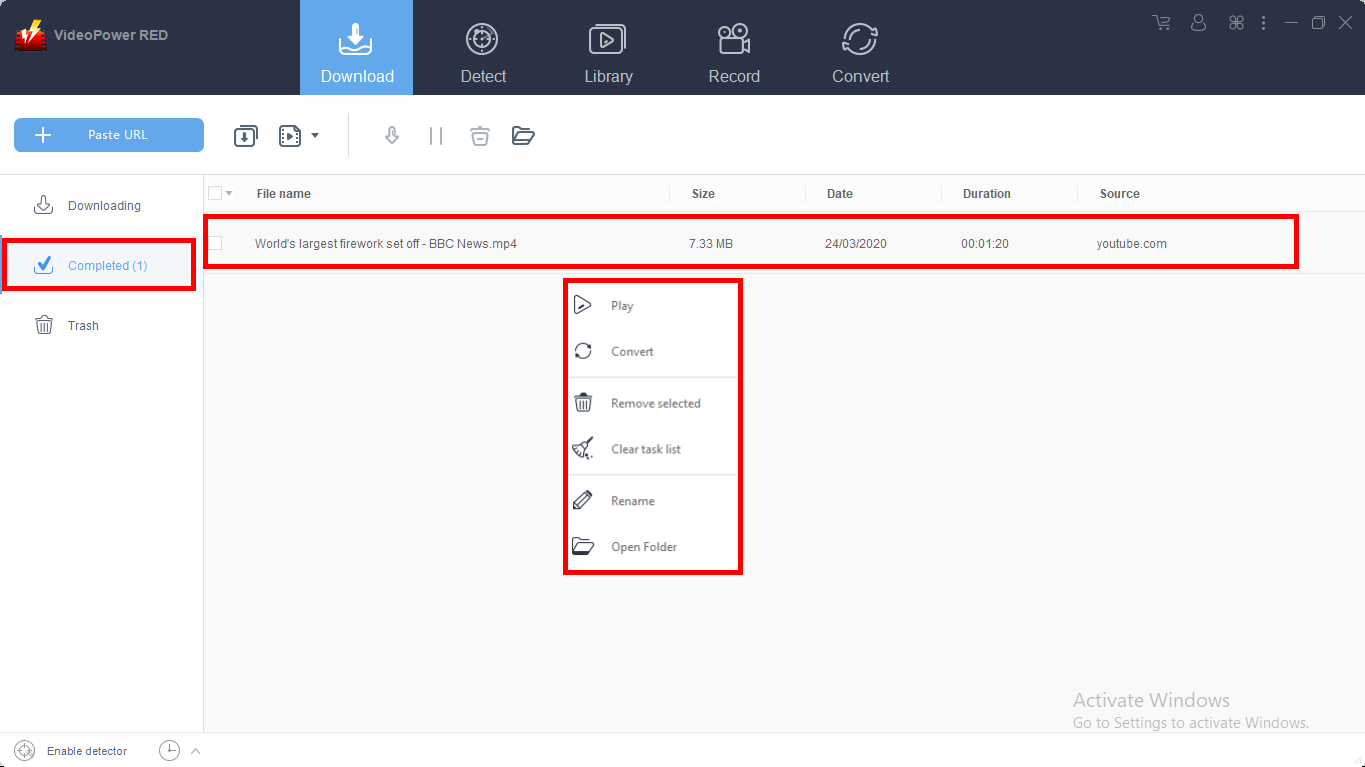
Go to the “Completed” tab to check if the download process is done. Right-click the file if you want to do more operations like “Play” to watch the video playback.
Method 2: Auto-Detect (Embedded Detector)
The software has the ability to auto detect the embedded URL of the played video. The detected video file will automatically be downloaded. This function is available on any sites except for YouTube videos since you will need to click on the “Download” button before it will be downloaded.

Open your JW video site using the built-in browser of the software under the “Detect” section. A notification “Media File Detected” will automatically pop up, notifying you that the video from the embedded URL is detected. The detected video file will be downloaded automatically.
Method 3: Record JW video
There are cases that might prohibit you to download your favorite video anymore like web updates or slow internet connection. By using the recording function, you can still save your favorite video.
Step 1: Record video
C
Click the “Record” tab to record the video and select the record type among “Region, Fullscreen, around the mouse, or Web camera” as preferred.
Step 2: Check the recorded video.

If the recording is done, you will see the recorded file under the “Record” tab.
Conclusion:
JW Player is a popular embeddable media player software that offers advanced and flexible functions for publishing videos, running video ads, and streaming web content. This player also offers a consistent viewing experience in HTML 5 and flash which can be streamed on most major devices such as smartphones, tablets, laptops, and PC desktops. It is encrypted by Javascript where it reduces video size so your videos render reliably and beautifully on every screen.
Since JW Player offers advanced technology and great output services, people nowadays are into using this media player. However, these videos cannot be downloaded locally. You cannot easily download JW videos on Firefox, Chrome, and other browsers. Most of us would still prefer to conveniently watch JW videos anywhere and anytime so the ability to download JW videos would be a great help.
VideoPower RED is a powerful video downloader tool you can use for the download of your favorite JW videos. It has a user-friendly interface that makes the download very easy and hassle-free. It offers an advanced feature called “Detector” which can be used in different methods like copy and paste URL, embedded detector, an external detector, or screen recording method. Maximizing the functions of each feature, this software also added a variety of useful and professional features like a recorder, converter, and video editor.
ZEUS series can do everything that VideoPower series can do and more, the interface is almost the same.
Check out NOW! Start easier with more affordable prices!




ZEUS Series
VideoPower brother products, start easier with more affordable prices!
| ZEUS BUNDLE 1 Year License ⇒ $29.99 |
ZEUS BUNDLE LITE 1 Year License ⇒ $19.99 |
ZEUS RECORD LITE 1 Year License ⇒ $9.98 |
ZEUS DOWNLOAD LITE 1 Year License ⇒ $9.98 |
||
| Screen Recorder | Screen&Audio Recording | ✔ | ✔ | ✔ | |
| Duration Setting, Schedule Recording | ✔ | ||||
| Video Downloader | Paste URL to download, batch download | ✔ | ✔ | ✔ | |
| Search/download video,browser detector | ✔ | ||||
| Music Recorder | Record music and get music ID3 tag info | ✔ | ✔ | ||
| Music search/download/record, CD Ripper/Creator, Audio Editor | ✔ | ||||
| Video Editor | Edit and convert videos, create slideshow | ✔ | |||
| Screen Capture | Capture screen, image editor | ✔ | |||