











ClipGrab is a software that allows users to download videos on their computer for free. It is not needed to create an account or pay for this software to use it. Although using a free downloader like ClipGrab is really practical but having the freedom to download any videos from any website that you want is really great.
Since ClipGrab is for free but has limited sites supported and can only download videos from open-source sites such as Youtube, Vimeo, Facebook, and some similar sites to it, you’ll want a video downloader that is reliable and safe. If you want to download videos from movie sharing sites using ClipGrab, unfortunately, it won’t work.
VideoPower RED or ZEUS is the best Youtube downloader software like no other. It is the best alternative for ClipGrab because it could download from more than hundreds of sites. VideoPower RED is the best 4K downloader alternative and is compatible with various browsers such as Internet Explorer, Google Chrome, Firefox, Safari, Opera, etc.
This software is not limited to downloading videos from your browsers but also provides all available formats of video for conversion including formats MP4, 3GP, FLV, WMV, MP3, WebM, MOV, etc. which is better for device compatibility issues the perfect ideal 4K video downloader.
ZEUS can do what VideoPower series can do and more with an almost similar interface.
Check out NOW! Start easier with more affordable prices!
Method 1: Copy and Paste Video URL to Download
Step 1: Copy and Paste Video URL from Website
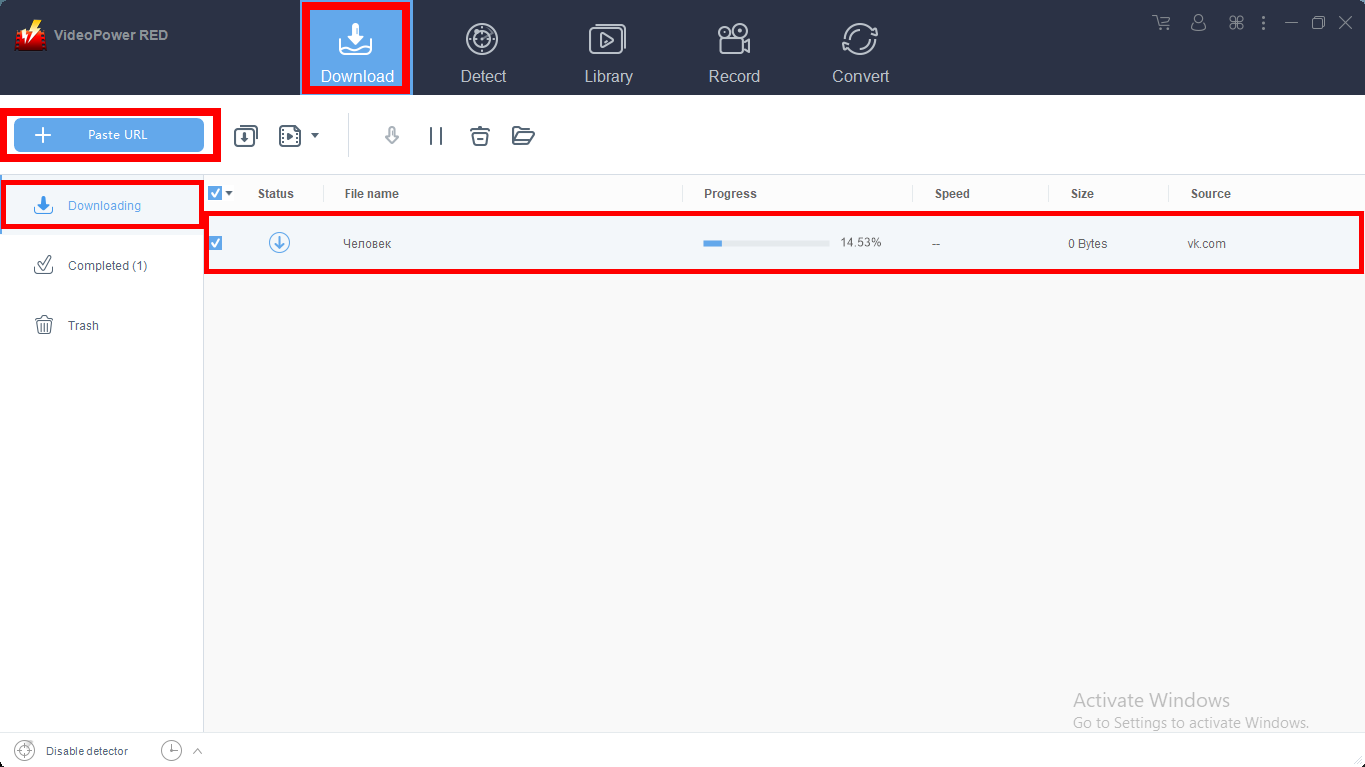
Copy the link of the selected online video file from the streaming website that you want to download and then paste it on the program by clicking the “Paste URL” button.
After doing this, the video will be processed in the “Downloading” section where you can track the download progress.
Step 2: Check the Downloaded Video from Website
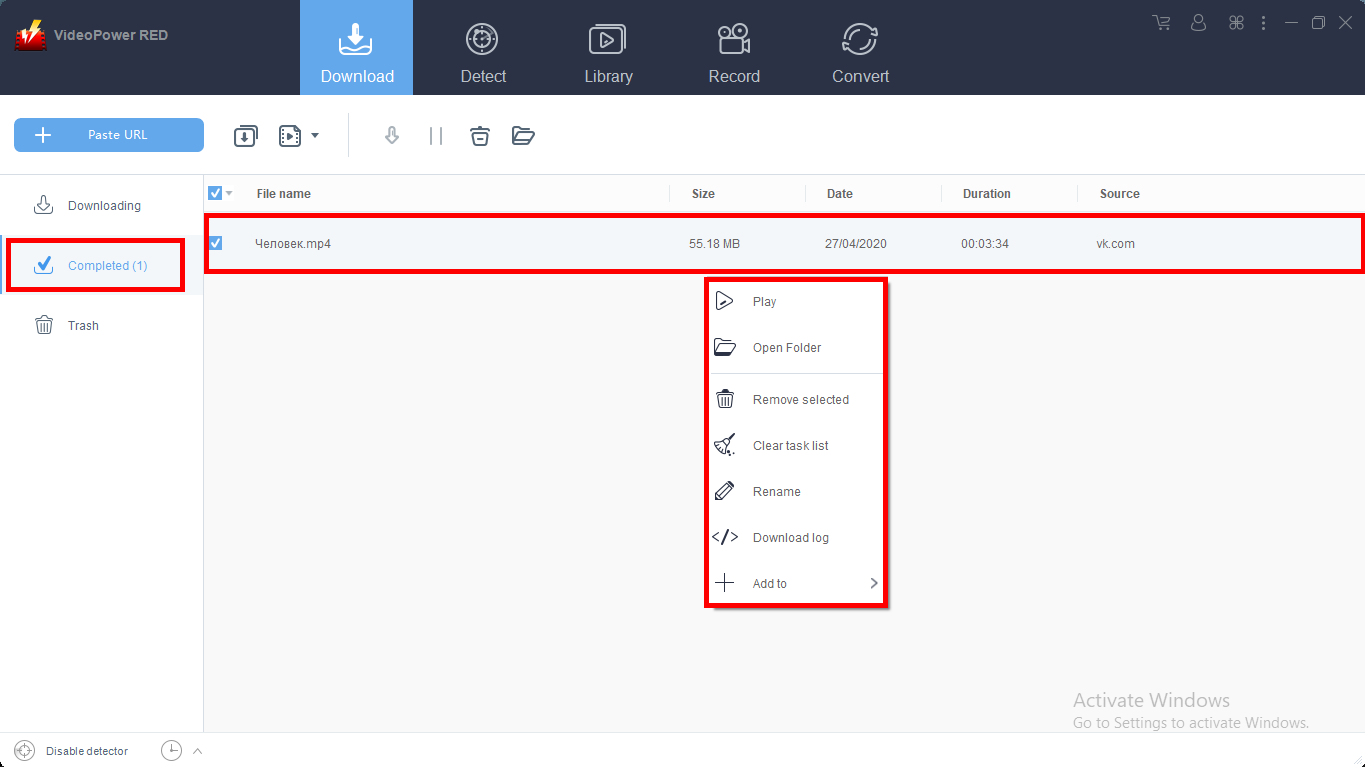
Wait for the video download process to finish, and then go to the “Completed” section to find the downloaded video from the streaming site.
If you wish for video playback, conversion, or edit, right-click on the file name and choose among the options.
Method 2: Use the Embedded Browser to Download Video
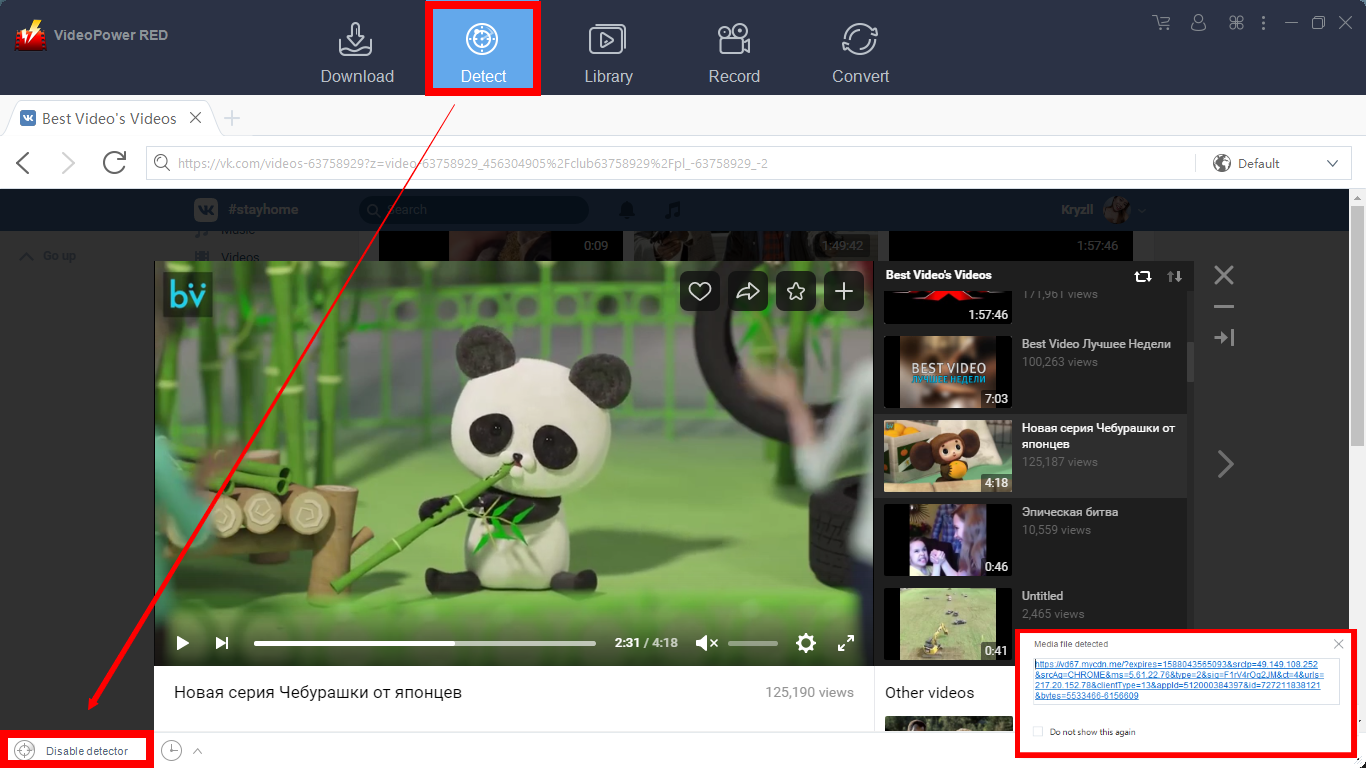
Open the website or streaming website using VideoPower RED embedded browser. Play the video you want to download and if the program supports the site, the video will be downloaded automatically.
A pop-up prompt “Media file detected” will show to let you know that the program is downloading the video.
For YouTube site:
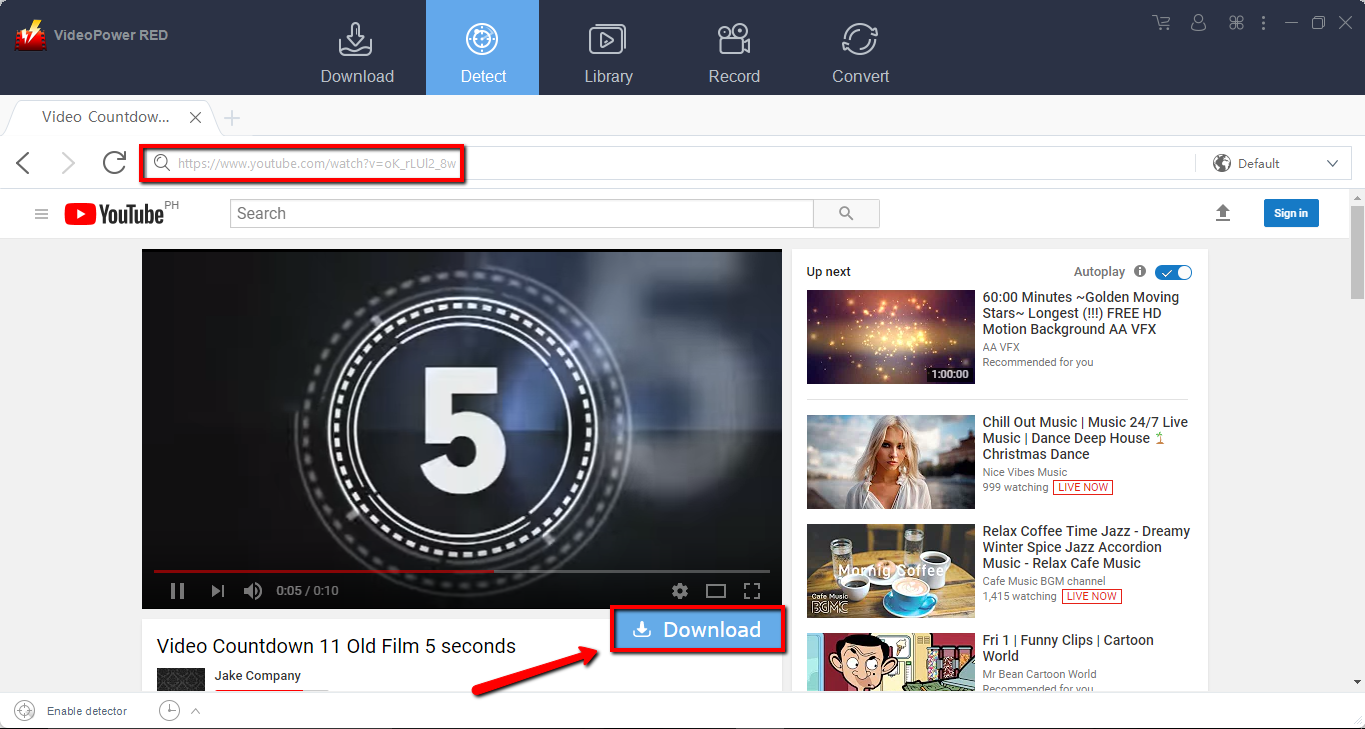
In downloading videos from YouTube, the video can be downloaded by clicking the “Download” button below the video.
Method 3: Download Video Using the External Detector
Step 1: Open Settings
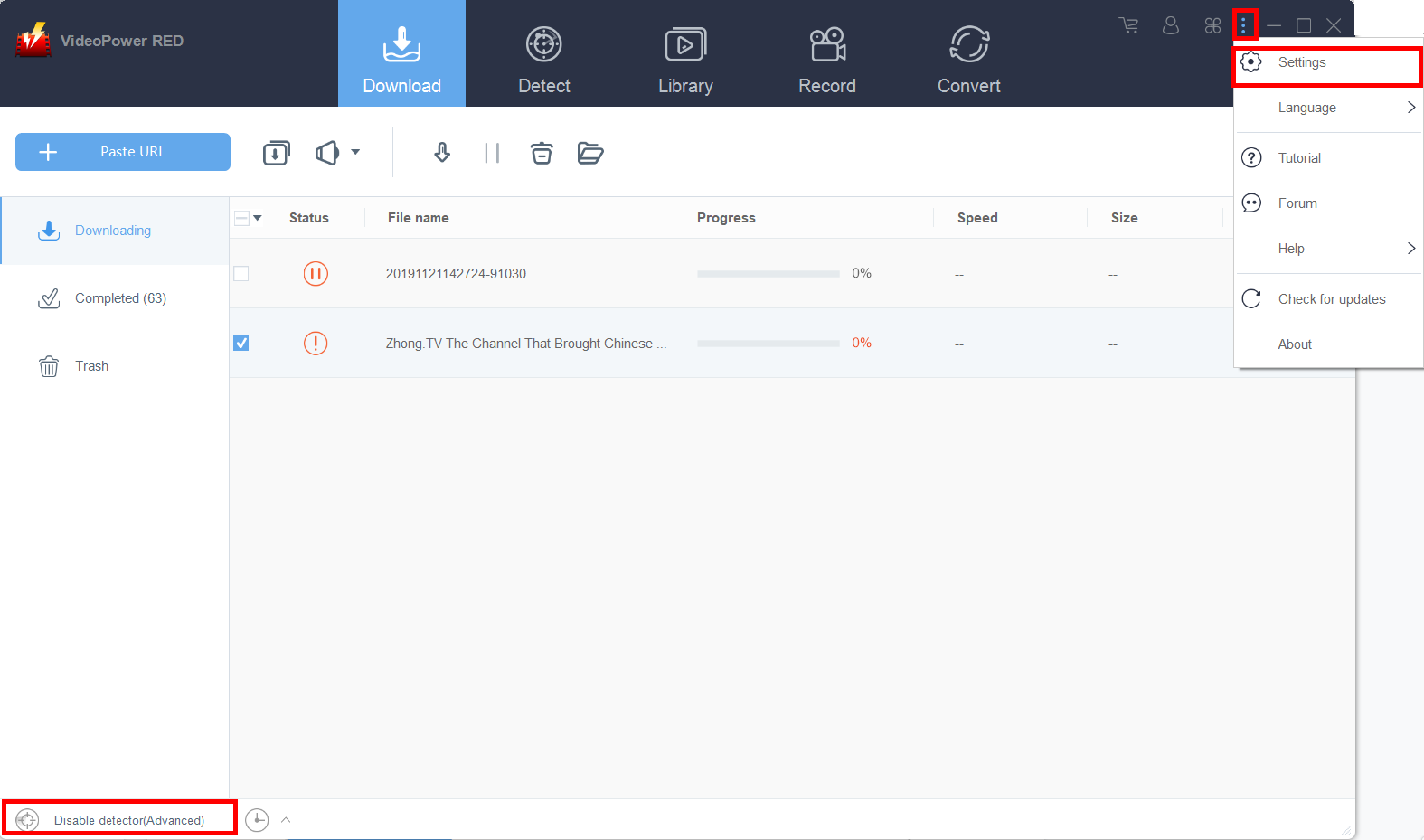
Click on the “Settings” button on the upper-right corner of the interface to open the settings.
Step 2: Enable the Advanced Detector to Download Online Videos
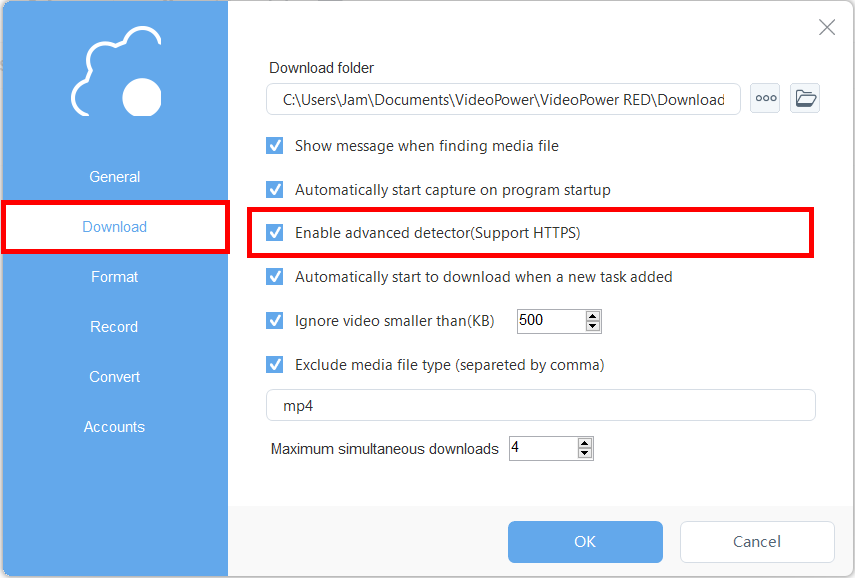
Set “Enable Advanced Detector” on the download settings. Click “OK” to save the changes made.
Then find the video that you want to download using your preferred browser, play the video, and the VideoPower RED will automatically detect and download the video from that external source.
Conclusion:
Using VideoPower RED assures that smooth and easy download and conversion. It has a user-friendly and satisfactory interface and fast conversion speed while preserving original quality and that is the reason why it is popular with users.
Download VideoPower RED now to experience its full features.
ZEUS series can do everything that VideoPower series can do and more, the interface is almost the same.
Check out NOW! Start easier with more affordable prices!




ZEUS Series
VideoPower brother products, start easier with more affordable prices!
| ZEUS BUNDLE 1 Year License ⇒ $29.99 |
ZEUS BUNDLE LITE 1 Year License ⇒ $19.99 |
ZEUS RECORD LITE 1 Year License ⇒ $9.98 |
ZEUS DOWNLOAD LITE 1 Year License ⇒ $9.98 |
||
| Screen Recorder | Screen&Audio Recording | ✔ | ✔ | ✔ | |
| Duration Setting, Schedule Recording | ✔ | ||||
| Video Downloader | Paste URL to download, batch download | ✔ | ✔ | ✔ | |
| Search/download video,browser detector | ✔ | ||||
| Music Recorder | Record music and get music ID3 tag info | ✔ | ✔ | ||
| Music search/download/record, CD Ripper/Creator, Audio Editor | ✔ | ||||
| Video Editor | Edit and convert videos, create slideshow | ✔ | |||
| Screen Capture | Capture screen, image editor | ✔ | |||