











iLivid is a top-notch download manager that simplifies downloading videos from various streaming sites. This program can download videos by just putting the video URL.
This is a great program with a wide range of compatibility with any Windows version but many people also experienced frequent crashes and errors. Even though it is compatible with different Windows versions, it supports few websites knowing that there are thousands of websites out there.
Due to these reasons, people find software as an iLivid alternative that will meet their expectations in downloading videos. This VideoPower RED is capable of doing this. It can download videos from over 1000 various streaming sites such as Youtube, Vimeo, DailyMotion, Vevo, etc.
VideoPower RED or ZEUS has more features that are placed into one. This software can convert multiple formats such as MP4, 3GP, FLV, WMV, WEBM, MOV, etc. which is better for device compatibility issues. It can also edit/cut/combine a video/audio, has built-in browser universal search-download, PC recording, etc.
It’s an all-in-one video downloader and converter, etc at the same time. So, I must say VideoPower RED is the best video downloader and best iLivid alternative.
Hit that download button below to give it a try!
ZEUS can do what VideoPower series can do and more with an almost similar interface.
Check out NOW! Start easier with more affordable prices!
Method 1: Copy and Paste the URL to Download Video
VideoPower RED is capable of downloading videos by just copy-pasting the video URL. To do so,
Step 1: Copy the URL of the video
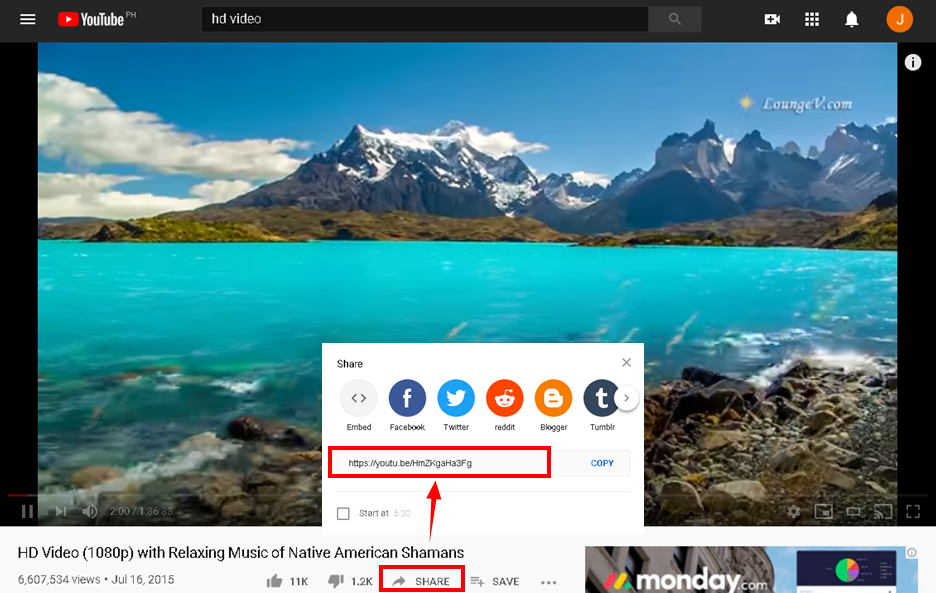
Open your PC browsers and open the website and search for the video you want to download. If you will download videos from YouTube just simply copy the link through the “Share” button.
Step 2: Paste the copied URL to VideoPower RED
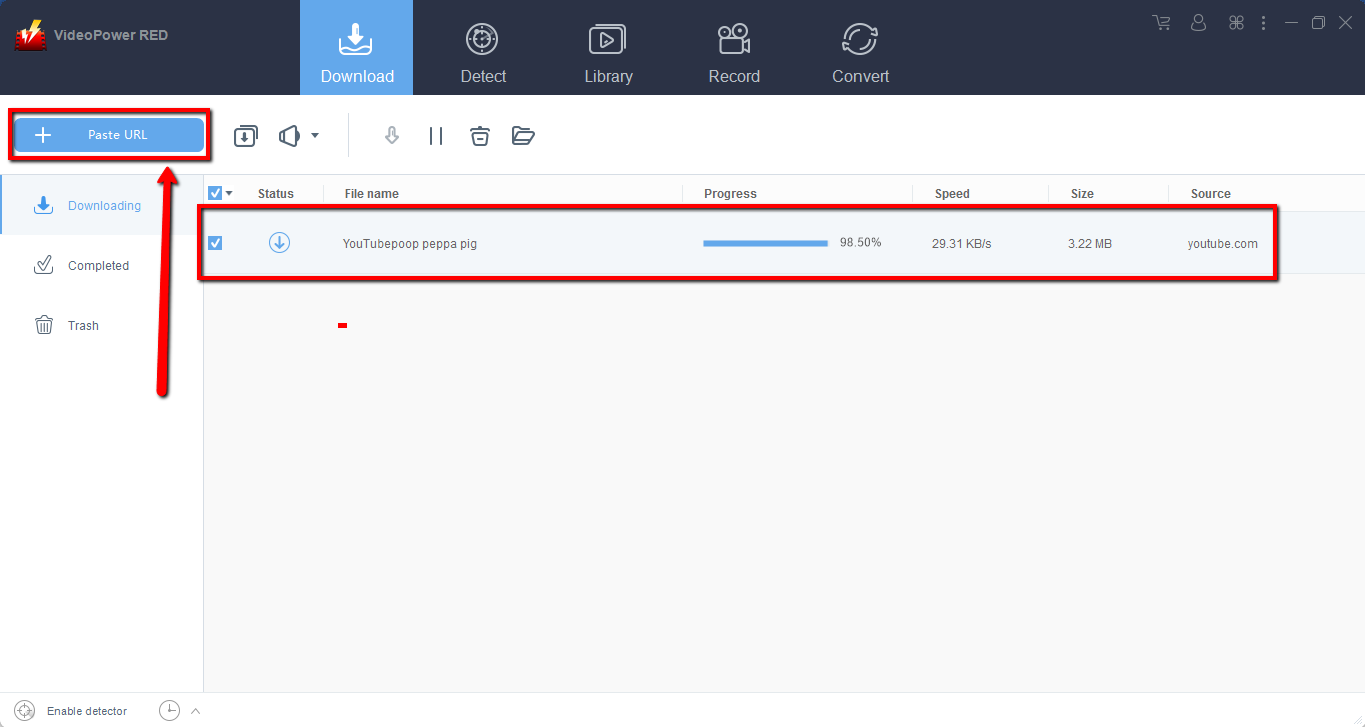
Run the program and paste the copied link to it by clicking the “ + Paste URL” button. After that, you will see the video is downloading in the download control panel.
Step 3: Preview the downloaded Video
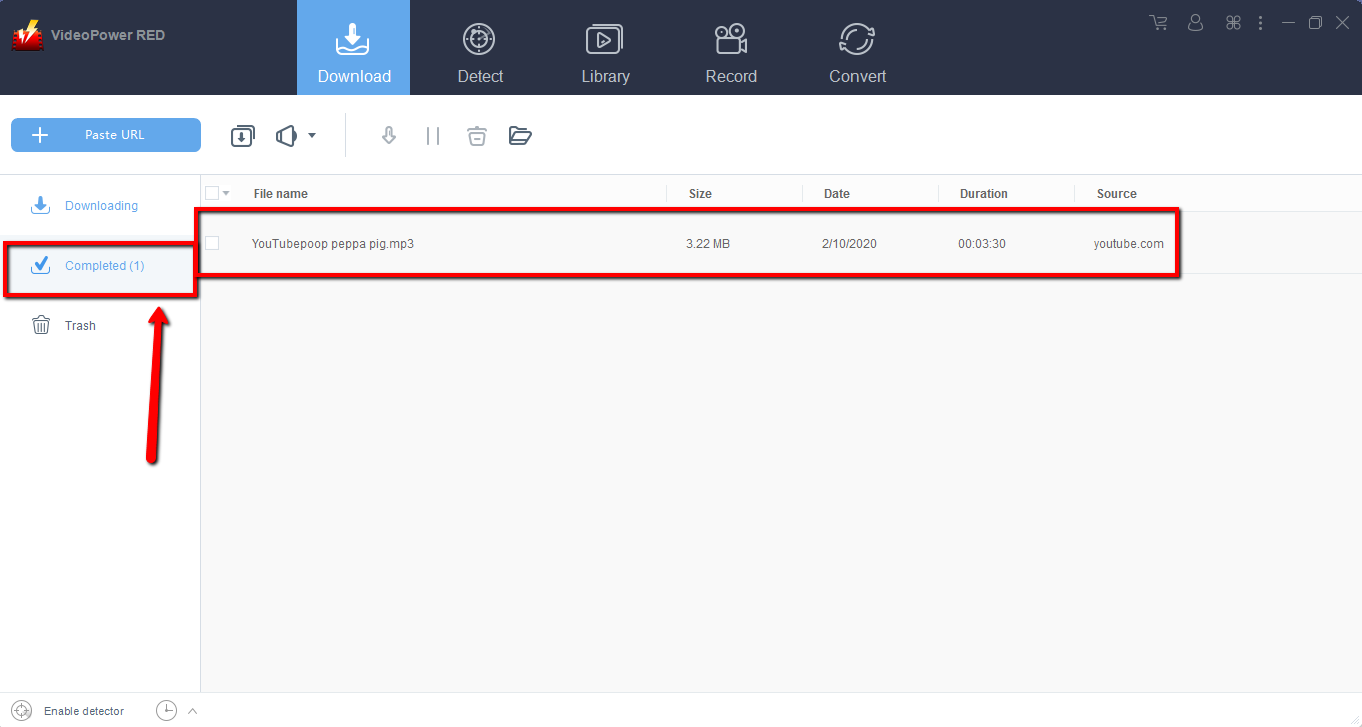
Wait for the download to finish, and then go to the “Completed” section to find the downloaded video. Double-click to preview.
Method 2: Use Auto-detect to Download Videos
This software has a built-in browser that can detect the video streaming on it and download the video automatically.
Go to the “Detect” section of the software, search the video that you want to download, and play it using the embedded browser
Click the “Download” button to start downloading the playing video.
Wait for the download to finish, and then go to the “Completed” section to find the downloaded video. You can right-click to do more operations and double-click to preview.
Note: If you will download the video using different websites through the Detect function, just play it and the program will detect it and will be added to the downloading list.
Conclusion:
VideoPower RED has the same feature as iLivid and with more features package on it. It is the best video downloader on windows. So no matter what Windows OS you are using, you can install it without a problem. With the beautiful interface, it’s easier for you to use and adapt easily.
VideoPower RED is not limited as a downloader, it’s also a converter and video editor. It has a built-in video editor that will enable you to merge multiple videos into one single file. This software will allow you to edit slideshows or videos, apply watermarks, effects, and other basic video editing options such as trimming or cropping.
Moreover, it has a split-screen tool for your photos and videos and a screen recorder that allows you to capture any on-screen activity on your computer with audio.
Download VideoPower RED now to experience its full features.
ZEUS series can do everything that VideoPower series can do and more, the interface is almost the same.
Check out NOW! Start easier with more affordable prices!




ZEUS Series
VideoPower brother products, start easier with more affordable prices!
| ZEUS BUNDLE 1 Year License ⇒ $29.99 |
ZEUS BUNDLE LITE 1 Year License ⇒ $19.99 |
ZEUS RECORD LITE 1 Year License ⇒ $9.98 |
ZEUS DOWNLOAD LITE 1 Year License ⇒ $9.98 |
||
| Screen Recorder | Screen&Audio Recording | ✔ | ✔ | ✔ | |
| Duration Setting, Schedule Recording | ✔ | ||||
| Video Downloader | Paste URL to download, batch download | ✔ | ✔ | ✔ | |
| Search/download video,browser detector | ✔ | ||||
| Music Recorder | Record music and get music ID3 tag info | ✔ | ✔ | ||
| Music search/download/record, CD Ripper/Creator, Audio Editor | ✔ | ||||
| Video Editor | Edit and convert videos, create slideshow | ✔ | |||
| Screen Capture | Capture screen, image editor | ✔ | |||